Our customer support is available 24/7:


What Is A Pay Stub? The 2026 Guide To Reading Every Line

What is a pay stub? It's the itemized statement that comes with your pay, on paper or online, showing your gross pay, every tax and deduction, and your net pay for that period.
This guide covers what's on it, how to read codes like OASDI and GTL, and what to do if your employer never hands you one. Need one right now? Our check stub maker builds an accurate one in minutes.
Key Takeaways
- A pay stub is the itemized breakdown behind your paycheck or direct deposit: gross pay, taxes, deductions, and net pay.
- Social Security (OASDI) is withheld at 6.2% up to $184,500 in 2026; Medicare is 1.45%, plus 0.9% more once your wages pass $200,000.
- No federal law requires employers to provide one, but most states require some form.
- Keep your records at least until you've matched your last one to your W-2.
- Nothing from your employer? You can create your own with an online generator.
What Is a Pay Stub? The Simple Definition
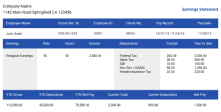
It's the itemized statement that comes with your paycheck or direct deposit. It breaks down employee pay: gross earnings, taxes and deductions, and take-home pay for that period. It also shows your year-to-date totals. Think of it as the receipt for your paycheck.
Some employers attach a paper copy to a physical check. Others post electronic paystubs to an online portal the moment your direct deposit clears. Either way, it's the same document doing the same job.
What Are Pay Stubs Used for, Beyond Payday Curiosity?

It's proof. A landlord evaluating your rental application will usually ask for your one or two most recent copies, and a lender wants the same thing for a loan.
It's also your own audit trail. At tax time, your final year-to-date gross won't match your W-2's Box 1 exactly, because pre-tax 401(k) and health premiums lower Box 1 but not your gross pay. That's normal, not an error.
What Important Information Is Available on a Pay Stub?
Every version covers the same core ground, even when the layout differs by employer:
- Pay period and pay date: the dates you're being paid for, and when the money lands.
- Gross pay: everything you earned before anything comes out, including overtime or bonuses.
- Deductions: taxes, retirement contributions, and insurance premiums, split into pre-tax and post-tax.
- Net pay: what actually hits your account.
- Year-to-date (YTD) totals: running totals since January 1st for gross pay, each tax, and each deduction.
- Employer and employee info: company name and address, plus your name and often just the last four digits of your Social Security number rather than the full thing.
How to Read the Codes on Your Stub

A few codes confuse almost everyone: FICA, OASDI and GTL.
What is FICA on a pay stub? It's the umbrella term for Social Security and Medicare together, the two federal payroll taxes that fund those programs. OASDI is the formal name for the Social Security piece: Old-Age, Survivors, and Disability Insurance. Your employer withholds 6.2% of your wages up to the 2026 wage base of $184,500, for a maximum employee contribution of $11,439.00, and matches that amount out of pocket. Medicare sits right below it at 1.45% on all your wages with no cap, and an extra 0.9% Additional Medicare Tax kicks in once your wages for the year pass $200,000 (you alone pay that piece; there's no employer match).
What is GTL on a pay stub? It stands for group-term life insurance. If your employer covers you for more than $50,000 of it, the IRS treats the value above that threshold as taxable income, even though you never see the cash. It shows up as an earnings line that raises your taxable wages, not a deduction. Abbreviations vary by payroll provider, so check with HR if you spot a code this guide doesn't cover.
What Does a Paycheck Stub Look Like? A 2026 Sample
Here's a biweekly example at $2,000.00 gross, showing where the FICA math comes from:
| Line | Amount | Note |
|---|---|---|
| Gross pay | $2,000.00 | Before anything is withheld |
| Pre-tax 401(k), 3% (example) | -$60.00 | Lowers income-tax wages, not FICA wages |
| Social Security, 6.2% | -$124.00 | Statutory rate |
| Medicare, 1.45% | -$29.00 | Statutory rate |
| Federal income tax (illustrative) | -$180.00 | Depends on your W-4 and total income |
| State income tax (illustrative) | -$45.00 | Depends on your state; some charge none |
| Net pay | $1,562.00 | What actually lands in your account |
Only the Social Security and Medicare lines use fixed statutory rates. The income-tax lines above are examples; yours will differ based on your W-4 and where you live.
Payslip vs Pay Stub vs Pay Statement: Same Thing, Different Names
Different employers and different states use different words for the same paperwork:
| Term | What it means |
|---|---|
| Pay stub | The itemized statement attached to your pay |
| Pay statement | Same document; common in official or state-law language |
| Wage statement | Same document; common on the West Coast |
| Payslip | Same document, especially outside the US. Paid in Canada? Use our Canadian pay stub generator. |
| Talón de pago / comprobante de pago | The same document in Spanish. Our Spanish pay stub generator makes one. |
| Paycheck | The actual payment; not the same as the paperwork itself |
| W-2 | Your annual summary, not a per-paycheck document |
A payslip and a pay stub are the same document under different names.
How Do I Get Pay Stubs?
It depends on your situation.
Current employee: check your employer's portal or app for an electronic pay stub first, or ask HR or payroll directly if you can't find one there.
Former employee: request your records in writing before your last day if you can, since portal access often ends once you're off the payroll.
Self-employed: there's no employer to ask, so you'll need to create your own. If your pay arrives by direct deposit, your bank statement helps, but it won't break down taxes and deductions the way a real one does.
Are Employers Required to Give You One?
Federal law doesn't require it. The Fair Labor Standards Act requires employers to keep accurate wage and hour records, but it doesn't say those records have to be handed to you automatically.
State law fills the gap, and it varies. Some states require employers to provide one every pay period, some only require that you can access one on request, and a handful, mostly in the South, have no general requirement at all. Check your state labor department's website if you're not sure where you stand.
Where a state does set a rule, it usually falls into one of four buckets:
- No requirement. The state sets no rule either way.
- Access only. Your employer must make one available, often through an online portal.
- Access with print rights. You can also ask for a paper copy.
- Opt-in or opt-out. You choose paper or electronic, and switching needs your consent.
A PDF or portal view satisfies the rule almost everywhere. It only becomes a problem if your state guarantees paper and your employer refuses to provide it.
How Long Should You Keep Your Records
Employers have to keep payroll records for a while: the Fair Labor Standards Act requires wage records for at least three years, and the IRS requires employment tax records for at least four years. As an employee, a common rule of thumb is to hold onto your own copies for at least a year, or until you've checked your final one against your W-2 at year-end and understood any gap (pre-tax deductions make Box 1 lower than your gross pay, which is normal).
Common Mistakes to Watch For
Errors happen more often than you'd think. Watch for the wrong number of hours worked, a deduction that appears twice, or a raise that never made it into your gross pay. Being classified as a contractor when you're actually an employee is a bigger red flag, since it changes how your taxes are withheld entirely. Catch it early: flag anything that looks off to your payroll department the same pay period you notice it.
How to Make Your Own
If you don't have payroll software behind you, a few options work well. Small teams can lean on payroll software once headcount grows, but a one-person business, a household employer, or a freelancer proving income for a single application usually doesn't need that overhead. An online generator, like our proof of income generator, gets you a correct, professional result in a few minutes, with the same fields a real payroll department would include.
Conclusion
A pay stub is the paper trail behind your paycheck: what you earned, what came out, and what you took home.
Need one for a rental application, a loan, or just your own records? Create one with our pay stub generator in a couple of minutes.