100% Money Back Guaranteed for 30 Days
100% Security Secure Payment Method
100% Satisfaction We Care About Your Satisfaction
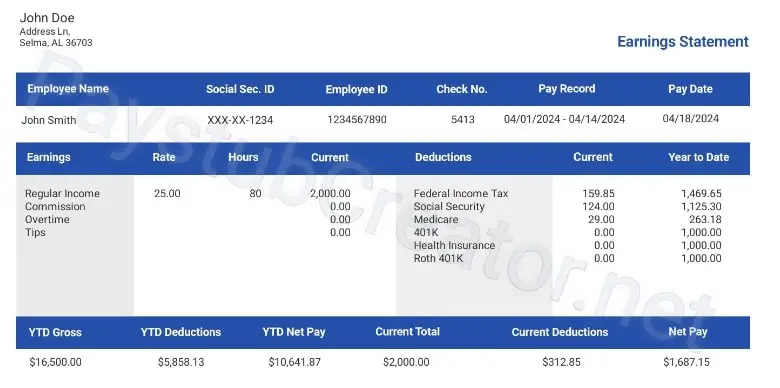
paystub-example

How our Paystub Generator Works

Fill in your details and a finished PDF is waiting before your coffee cools.

Step 1: Enter Company & Employee Details

Add your business name, EIN, employee or contractor info, pay period dates, pay rate, and hours worked. Pick W-2 employee format or 1099 contractor format - you can switch between them as you go.

Step 2: Preview & Verify Tax Calculations

Federal income tax, state income tax, FICA, and any custom deductions are computed for you using current IRS withholding tables plus your state's tax formulas.

Step 3: Download Your PDF Instantly

A print-ready pay stub PDF is yours the moment you click. Save it, print it, or email it straight to your employer, bank, or landlord. There's no email confirmation step and no account to set up.


Who is PayStubCreator For?

Different work, different pay stub. We built PayStubCreator for the three situations most people land in.

Enter your
information

Preview
your stub

Download
your stub

See what our customers say about us

4.4 star-rating

4.4 out of 5.0 stars on 717 reviews

Latest Articles & Financial Tips From Our Blog

Stay informed with our blog, where we simplify taxes, paystubs, and proof of income topics. Get practical tips, financial advice, and the latest updates to keep your money matters in check.

Whether you're managing personal finances or running a small business, we've got insights to help you stay ahead.

Get Started Today!

Paystubs made easy with PayStubCreator.net. Whether you’re working hard on the job or managing multiple gigs, our paystub creator helps you generate stubs quickly and accurately - so you can focus on what matters most.

Create Your Pay Stub Now – Instant Download, 100% Guaranteed!

Are you having any issues?

Fill out our contact form, and we will get back to you as soon as we can!

Contact us
Did you lose your order?

Don’t worry! You can resend it your order for free.

Resend Your Order
Create Employee Pay Stubs Online Today!

Who is PayStubCreator For?

Different work, different pay stub. We built PayStubCreator for the three situations most people land in.

Employers & Small Businesses

Running payroll for a small team? You can build pay stubs for 25+ employees in a single session. Federal income tax, state income tax, FICA, and Medicare withholding are all worked out automatically per employee. There's no payroll software to install and no accountant to hire just to get this done.

  • Build multiple employee pay stubs in one session
  • Drop in your company logo and branding
  • Per-employee federal and state tax handled for you
  • Add overtime, bonuses, commissions, and custom deductions
  • Year-to-date (YTD) earnings on every stub

Self-Employed & Freelancers

If you're self-employed, proving income shouldn't be the hardest part of getting a loan or signing a lease. Create professional pay stubs that banks, landlords, and lenders recognize, even when you don't have an employer cutting you a paycheck. We built this for freelancers, sole proprietors, and anyone who needs lender-ready documentation. Not sure what landlords typically accept? Our guide on 5 ways a renter can show proof of income covers it.

  • Act as both employer and employee on the same stub
  • Accepted by banks, landlords, and lenders
  • Flexible pay frequency
  • Year-to-date (YTD) earnings tracking
  • Self-employment tax handling

Independent Contractors & 1099 Workers

Get paid 1099? You can document income from any project, gig, or contract on a clean pay stub. We built this for independent contractors and subcontractors who consolidate income from a few different places onto a single document.

  • Supports 1099 and contract income
  • Per-project or recurring pay schedules
  • Combine income sources on one stub
  • IRS-compliant 1099 format
  • Download and share in seconds
check stub maker

Features That Save You Time

Every feature on this page was added because real users asked for it. Here's what's under the hood.

IRS-Verified Tax Calculations

The paystub generator works out federal income tax, state income tax, Social Security, and Medicare using the current IRS withholding tables (Publication 15-T). We update the tables every tax year. The logic the IRS recommends is the logic we apply to your stub.

Current W-4 Withholding Support

Employee withholding follows the latest Form W-4 specification. That means every number on your stub holds up if somebody ever asks how you got there.

All 50 States Built In

State income tax, state W-4 variants, and local withholding rules (city and county taxes where they apply) are already wired in for all 50 states. We refresh the tax tables annually, so you're never working off last year's rates.

1099 & Contractor Support

Click once to switch between W-2 employee paystubs (with full federal and state withholding) and 1099 contractor paystubs (no automatic withholding). Per-project pay, multiple income sources, and IRS-compliant 1099 formatting are all in there. You don't need a separate tool for contractors.

Custom Earnings & Deductions

Add overtime, tips, bonuses, and commissions. On the deductions side: health insurance premiums, 401(k), IRA, HSA, FSA, child support, and wage garnishments. Every entry recalculates the federal, state, FICA, and Medicare tax along with your net pay, instantly.

Professional Pay Stub Templates

Choose from a range of professional pay stub templates, classic, modern, and corporate. Every template takes your company logo and branding, and every template uses an IRS-compliant format.

Pay Only When You Need It

The preview costs nothing. You only pay when you decide to download the PDF. Same flat charge per stub, every time. No subscription, no recurring billing.

Your base pay stub includes:

  • Professional pay stub templates
  • Federal and state tax auto-calculations
  • FICA, Medicare, and Social Security included
  • Instant PDF download
  • Company logo upload
  • Year-to-Date (YTD) totals
  • Unlimited corrections before payment
  • IRS-compliant format
  • Saved address book for repeat use

Optional add-ons like a detachable direct deposit slip are available at checkout for a small extra charge.

Your Paystub Generator, on Mobile

PayStubCreator works on your phone. Build a pay stub from your phone in under 3 minutes. No desktop. No app to download.

  • Full feature parity with the web. Every feature, every tax calculation, every template behaves the same way on mobile.
  • Email and share directly. Send your PDF to your employer, bank, or landlord without leaving the page.
  • Responsive across devices. iOS Safari, Chrome on Android, tablet, desktop. Your session picks up where you left off.

Why Choose PayStubCreator?

Accurate Payroll Calculations

  • Federal income tax and state income tax withholding
  • FICA taxes (Social Security and Medicare)
  • Year-to-Date (YTD) calculations on every stub
  • Withholding calculations based on the latest Form W-4
  • FUTA and SUTA support for employer filings

Customize Pay Stubs to Fit Your Needs

  • Pick from multiple professional pay stub templates
  • Add your company logo
  • Add prior year-to-date (YTD) values
  • Add any additional income or deductions, bonuses, commissions, garnishments
  • Include federal and state unemployment values if you're filing with them

Preview & Make Unlimited Corrections

Look at your pay stub before you download. If anything's off, fix it. Swap a template, correct a name, adjust a number, update a date, you don't have to start over. We want you walking away with a stub you trust.

pay stub generator free pdf

Frequently Asked Questions

Common questions about how to make pay stubs, how to create paystubs online, pricing, and what a paystub actually contains.

What is a pay stub?

A pay stub is the document that breaks down a single pay period: gross pay, taxes withheld (federal income tax, state income tax, FICA, Medicare), deductions, and net pay. It's the supporting document banks, landlords, and lenders typically ask for when they want to verify income.

How do I generate a pay stub online?

Three steps, under 2 minutes. Enter your company and employee details (business name, EIN, employee info, pay period, wages). Preview the auto-calculated federal, state, FICA, and Medicare taxes and verify them. Download the PDF. The process works the same for a single stub, paycheck stubs in bulk, or check stubs for contractors.

Is your paystub generator paid or free?

The preview costs nothing. Build your full pay stub, verify every tax calculation, see exactly what the PDF will look like. You only pay when you download the final PDF. No subscription, no recurring charges, no hidden fees.

What information is included on a pay stub?

A complete pay stub includes: employer name and EIN, employee details, pay period dates, pay rate, gross pay, federal income tax withholding, state income tax withholding, FICA (Social Security and Medicare), benefit deductions (health insurance, 401(k), garnishments), year-to-date (YTD) totals, and net pay. New to reading one? Our guide on pay stub abbreviations walks you through every line.

What's the difference between a pay stub and a paycheck?

The paycheck is the payment itself, the deposit, the check, the wire. The pay stub is the document that explains how the paycheck was calculated: gross pay, tax withholdings, deductions, net pay. Some employers send the digital pay stub separately from the direct deposit notification. That pay stub is what banks and landlords usually want to see.

Are the tax calculations accurate?

Yes. Federal income tax, state income tax, FICA, Social Security, and Medicare are calculated using the current IRS withholding tables (Publication 15-T) plus the state-specific formulas. We follow the latest Form W-4 spec and refresh the tables every tax year. You don't have to track rate changes yourself.

Can I use this for both employees and 1099 contractors?

Yes. The generator handles W-2 employee pay stubs (with full federal and state withholding) and 1099 independent contractor pay stubs (no automatic withholding unless TIN or backup-withholding rules apply). You can flip between the two at any point — handy if you wear both hats.

Does PayStubCreator work in all 50 U.S. states?

Yes. State income tax, state W-4 variants, and local withholding rules are built in for all 50 states. That includes state-specific items like California's PTO accrual, New York's meal break premium, and Massachusetts' Sick Time Act balances.

What does YTD (Year-to-Date) mean?

Year-to-Date totals are cumulative numbers from January 1 of the current year through the pay period you're on now: total earnings, taxes withheld, and net pay. Tax filers, loan officers, and budgeting apps look at YTD first. PayStubCreator calculates it automatically and lets you carry prior YTD values over from another payroll system.

Can I include 401(k), health insurance, or garnishments?

Yes. Custom deductions are supported on every pay stub: 401(k) and IRA contributions (pre-tax), health insurance premiums, dental and vision premiums, HSA and FSA contributions, child support, and court-ordered wage garnishments. Each deduction recalculates net pay and the tax totals so the bottom line is always right.

What if I need to edit my paystub after creating it?

Before payment, the preview is editable as many times as you need. Spot an error after downloading? Contact our 24/7 support team and we'll help you correct it without an extra charge. Mistakes happen and we'd rather fix them than make you start from scratch.

How fast can I download my pay stub PDF?

Instant. From entering details to PDF download, it usually takes under 2 minutes. No email confirmation, no account creation, no waiting.

Need Help?

FAQ

Quick answers to the most common questions about creating, downloading, and editing your stubs.

Contact Support

Chat, phone (+1-855-454-6444), or email (support@paystubcreator.net). 24/7 customer service. Real humans, every shift.

Hi! How can I help you? Kris

Hi, there!

How can we help today?

Before we begin, please provide us with some quick information to assist you better:
Start the chat