Our customer support is available 24/7:


How To Calculate Year-To-Date Income From A Pay Stub (2026)

Year-to-date (YTD) income is the total gross pay you've earned since January 1, added up through your most recent paycheck. Your pay stub's YTD column already does this math for you.
Landlords, lenders, and benefits programs ask for this number more often than you'd think. Knowing how to check it yourself means you're not stuck waiting on payroll to confirm it. This guide covers how to calculate year-to-date income from a pay stub, the same math behind every pay stub generator, including ours. You'll also learn to turn it into an annual or monthly figure for 2026.
Key Takeaways
- Your YTD gross pay is the running total on your stub since January 1. Add it up yourself if two stubs don't match.
- There are three ways to annualize it: by pay period, by weeks elapsed, or by days elapsed. Pick one and stick with it.
- A pre-tax 401(k) lowers your income-tax wages but not your Social Security and Medicare wages. A Section 125 health plan lowers both.
- Your December stub's YTD gross usually won't match your W-2 box 1, and that's normal.
How to Calculate Year-to-Date Income From a Pay Stub
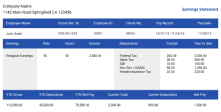
To calculate year-to-date income from a pay stub, find the YTD line on your latest check and use that gross pay total directly. It already adds every period since January 1. If your stub only shows the current period, add it to your last stub's YTD figure to get the running total yourself.
Look for a line labeled "YTD," "Year-to-Date," or "Gross Pay YTD," usually on the right side of the stub. It covers January 1 through the current date on your stub, and the YTD calculation works the same whatever your pay schedule.
One quick way to catch payroll mistakes: your current stub's YTD gross should equal last stub's YTD gross, plus this period's gross pay. If it doesn't match, something's off. Maybe it's a missed check, a correction, or a late bonus. Flag it to payroll before it affects your taxes or a loan application.
Once you know how to calculate year-to-date income from a pay stub, checking your own math takes under a minute.
What Does YTD Mean on a Pay Stub?

"YTD" is just one of many pay stub abbreviations worth knowing, and it shows up next to several different numbers on your stub. Each one answers a different question.
Gross Pay YTD
This is your total earnings before anything comes out, the figure landlords and lenders usually want to see first.
YTD Net Pay
This is what's actually hit your bank account after taxes and deductions. It's the number that matters most for your own budgeting.
YTD Hours Meaning
YTD hours are the total hours you've been paid for since January 1. Employers use it to track overtime and PTO accrual; you can use it to sanity check your own paycheck.
YTD Taxes and Deductions
This line adds up everything withheld so far this year: federal and state income tax (if you've seen "FWT" on your stub, that's federal withholding tax), Social Security, Medicare, and anything else taken from your pay. Check it before adjusting your W-4.
YTD earnings and tax figures reset on the first day of each calendar year, even if your employer uses a different fiscal year, since that's the period your W-2 covers.
A 2026 Example: How to Calculate Year-to-Date Income
Say you're applying for an apartment, and you've already checked how many pay stubs you need for an apartment. You're paid $2,400 gross every two weeks, with $120 going to a pre-tax 401(k) and $80 to a Section 125 health premium. This is your 20th paycheck of 2026, paid September 25.
| Figure | Per Check | YTD (20 checks) |
|---|---|---|
| Gross pay | $2,400 | $48,000 |
| Social Security/Medicare wages | $2,320 | $46,400 |
| Federal income-tax wages | $2,200 | $44,000 |
The 401(k) lowers your income-tax wages but not your Social Security and Medicare wages. The Section 125 premium lowers both; the same split applies when you calculate W-2 wages from a pay stub at year end.
How to Annualize Your Year-to-Date Income

Annualizing turns your YTD number into an estimate of your annual income. It's useful for a loan application or a quick income check. Knowing how to calculate year-to-date income is half the job. Turning it into a yearly or monthly figure is the other half, and there are three common ways to do it.
- Pay-period method: YTD gross divided by paychecks received, times paychecks per year (52 weekly, 26 biweekly, 24 semimonthly, or 12 monthly). Using the example above: $48,000 / 20 x 26 = $62,400. This annualized figure works for a car loan the same way it works for an apartment; if you're wondering how many pay stubs you need for a car, lenders usually want the same range.
- Weeks method: YTD gross divided by weeks elapsed, times 52.
- Days method: YTD gross divided by days elapsed, times 365.
All three should land close to the same number if your pay has been steady.
One pitfall to know about: a biweekly check dated Friday, January 2, 2026, mostly pays for work done in late December 2025. It still counts toward your 2026 YTD. That's because YTD follows the pay date, not the work date. Pick one method and use it consistently. Say which one you used if you're sharing the number with someone else.
How to Calculate Monthly Income From YTD Earnings
Once you have an annualized figure, divide it by 12: $62,400 / 12 = $5,200 a month. You can also divide your YTD gross by the number of months you've worked, though that gets less accurate if you started mid-month.
One warning: biweekly pay isn't the same as twice a month. Biweekly means 26 paychecks a year; semimonthly (twice a month) means 24. Mixing them up throws your yearly estimate off by two paychecks.
How to Calculate YTD Income Without a Pay Stub
No stub in hand? If you know your gross pay per period and how many checks you've actually received, multiply the two together. This same math handles year-to-date payroll for a small team if you're tracking it yourself for a few employees.
Self-employed or gig workers can do the same with invoices or deposits. Add up everything you've been paid since January 1, before business expenses, similar to these ways to prove self-employed income as a contractor. If you want something closer to a traditional format, see what a 1099 pay stub looks like.
Either way, treat the result as an estimate. An online YTD income calculator can speed this up, but only if your pay has been steady; it won't account for a bonus, a raise, or missed work.
You Might Also Like
- How Can I Get a Copy of My W-2 Online?
- How to Find Your Employee ID on a Pay Stub
- How to Access Your Pay Stubs
- What Is a Check Number on a Pay Stub?
Conclusion
Now that you know how to calculate year-to-date income from a pay stub, you can double-check it, annualize it, and turn it into a monthly number whenever you need to. If a mismatch turns up, run the reconcile check above before you assume the worst.
Need a pay stub with clear, accurate YTD totals for a rental application or loan? Create one with our pay stub generator in a couple of minutes.