Our customer support is available 24/7:


How To Get Pay Stubs From Direct Deposit: A Step-By-Step 2026 Guide

Here's how to get pay stubs from direct deposit: log in to your employer's payroll portal, such as MyADP or Workday, and download the statement from the Pay section. No portal access? Ask HR or your payroll department to send you a copy directly.
That document is worth having on hand, whether it comes from your employer or your own pay stub generator. A landlord, a lender, or a new employer may ask to see proof of income. This guide covers the fastest way to find your stub. It also covers what to do if your employer doesn't provide one, and how to show your pay when you're paid electronically.
Key Takeaways
- Check your employer's payroll portal first (MyADP, Paychex Flex, and Workday are common ones); that's usually the fastest way to a pay stub.
- No portal access? Give HR or payroll your pay period dates and employee ID, and ask for a PDF, not a screenshot.
- 92.7% of U.S. workers in PayrollOrg's 2025 survey get paid by direct deposit, but the pay stub is still a separate document from the deposit itself.
- No employer-issued stub? A pay stub generator lets you build an accurate record of your own income.
- Save each stub as a PDF the day it posts. Portal access often ends the moment you leave a job.
What a Pay Stub Looks Like When You're Paid by Direct Deposit
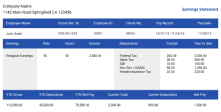
A pay stub, sometimes called a check stub, is the earnings statement behind your deposit payment. It lists your gross pay, taxes such as Social Security and Medicare, any other deductions, and your net pay for the period. Direct deposit is just the delivery method. Your paycheck lands straight in your bank account instead of arriving as a paper check.
The two aren't the same thing, even though people use the terms loosely. In PayrollOrg's 2025 Getting Paid in America survey, 92.7% of workers said their wages arrive by direct deposit, yet their pay stubs still come separately.
How to Get Pay Stubs From Direct Deposit

Most employers now offer a self-service portal where you can view and download your own pay stubs. Here's how to get to yours:
- Find your portal's name. Check your onboarding email, a past pay stub header, or your W-2 for your company payroll provider's name.
- Sign in, or reset your access if it's been a while. Look for a "Forgot password" or "New user" link right on the sign-in page.
- Open the Pay or Pay Statements section. It's usually a labeled tab or menu item.
- Download the PDF. Save the actual file rather than a screenshot, so every number stays legible.
- Store it somewhere you'll find it later, like a cloud folder organized by year.
How to Get a Copy of a Pay Stub From HR or Payroll
No luck online? Go straight to a person. Give your human resources department or payroll team your pay period dates and employee ID, and ask specifically for a PDF, not a screenshot. If you've already left the job, reach out fast: portal access for former employees is often cut off within days. Our guide on getting pay stubs from a previous employer covers that situation in more detail.
Where to Find Your Pay Stub in Common Payroll Platforms
Not sure which system your employer uses? Here's where pay stubs typically show up in a few common payroll platforms:
| Payroll Platform | Where Employees Find Pay Stubs |
|---|---|
| ADP | MyADP employee portal, under Pay |
| Paychex | Paychex Flex, in the pay history section |
| Workday | The Pay worklet |
| QuickBooks Payroll | QuickBooks Workforce |
| Gusto | Gusto Wallet, inside the Gusto app |
Don't see your employer's system listed? Check the header on an old pay stub, or ask payroll which platform they use.
What If Your Employer Doesn't Provide a Pay Stub?

Federal law, the FLSA, doesn't require employers to give you a pay stub, but most states do. Ask HR or payroll first. If they still say no, contact your state's department of labor to find out your state's rules. You can also create your own accurate record with a pay stub generator.
State and local pay statement rules fill the gap federal law leaves open. Some states require a stub every payday, others only when you ask for one, and many let employers go electronic-only as long as you can view and print it. If you've asked human resources directly and still come up empty, your state's labor office can tell you exactly what your employer owes you.
Running payroll for your own small team? Give employees portal access or email them a PDF each payday, and keep those records for at least three years, as federal rules require.
How to Show Pay Stubs With Direct Deposit
A pay stub PDF from your portal is your strongest option. It shows gross pay, deductions, and year-to-date totals in one document, which is exactly what most landlords and lenders want to see. A bank statement can back it up, but it only shows the deposit amount and date, not the breakdown behind it. And if a stub ever goes missing, our guide on protecting your pay stub records covers who to call first, starting with your bank.
An income verification letter from your employer works too, especially for a landlord who wants something official on letterhead. Neither handy on short notice? Last year's W-2 or a recent tax return can back up your income for bigger applications, like a mortgage.
Self-Employed and Don't Have an Employer Pay Stub?
If you're self-employed or a contractor paid by direct deposit, there's no employer portal to check. You get a deposit, not a stub, and that's normal. It only becomes a problem when a landlord or lender specifically asks for one.
Generate your own pay stub for your income records, and keep the numbers honest: your stub should reflect what you actually earned and set aside for taxes, not a rounded guess.
You Might Also Like
- How Many Pay Stubs Do You Need for an Apartment?
- How Many Pay Stubs Do You Need for a Car?
- How to Get a W-2 From a Previous Employer
- How Can I Get a Copy of My W-2 Online?
- What Is a Check Number on a Pay Stub?
Conclusion
Getting your pay stub when you're paid by direct deposit almost always starts with your employer's portal. HR or payroll is a solid backup when the portal comes up empty. Once you have it, that document proves your income to a landlord, a lender, or just for your own peace of mind. Don't have one to show? Use our paystub generator to create an accurate pay stub in minutes.