13 Mar, 2026
Time to read: 3 minutes
Last updated: 13 Mar, 2026 10:02 pm

Pay Stubs: What Employers Need To Know In 2026

Pay Stubs: What Employers Need To Know in 2026
Written by: - Phil Baker

Providing accurate pay stubs to employees is required in almost every state. Failure to comply could result in audits, disputes, or lawsuits. You need to know what goes on these documents and your state's rules. A paystub generator simplifies the process for any business.

This guide covers the basics, state-specific rules, the risks of fake paystubs, and how to create compliant records.

Key Takeaways

  • Pay stubs document gross wages, deductions, taxes, and net pay for each pay period
  • Most states require employers to provide pay stubs. Penalties for non-compliance vary by state
  • Using fake pay stubs is a federal crime with fines and up to 30 years in prison
  • A pay stub generator creates professional, calculation-verified stubs in minutes
  • The IRS requires employers to retain payroll records for at least 4 years after filing
Table Of Contents

What Are Pay Stubs?

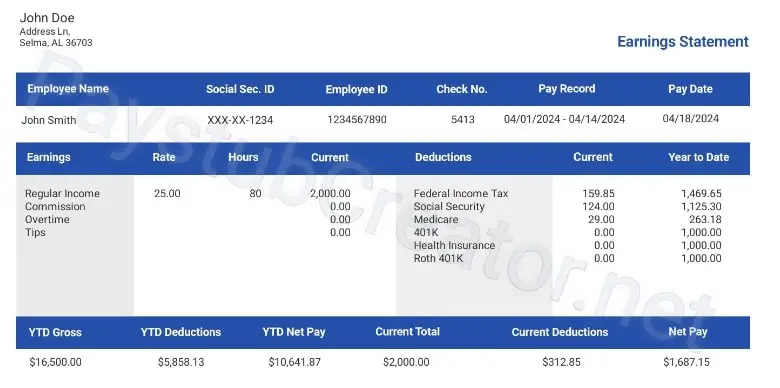
A pay stub is a document issued with each paycheck. It breaks down gross wages, tax withholdings, deductions, and net pay for a specific period. It's also called a paycheck stub or wage statement, and it can be printed or accessed online.

Every time you process payroll, employees should receive this record with their direct deposit. Online paystubs via employer portals are now standard. You may also hear these referred to as payroll stubs. The term varies by employer, but the meaning is the same. Pay check stubs are another common name for the same record.

What Information Is on a Pay Stub?

​What Information Is on a Pay Stub?

A standard pay stub template lists employee and employer details, pay period dates, and gross earnings. It also shows tax withholdings, benefit deductions, garnishments, and net pay. Most include year-to-date totals too. This mirrors a paycheck template from any major payroll provider. For common pay stub abbreviations, see our guide.

Employee and Employer Details

The header lists employer and employee names and addresses, pay period dates, and an employee ID number.

Gross Earnings

Total pay before deductions. It includes regular wages, overtime, bonuses, and commissions for the period.

Taxes and Deductions

Federal income tax, FICA taxes (Social Security and Medicare), and applicable state or local taxes. Employee deductions for health insurance, 401(k), and other benefits are shown here as well. Learn more about understanding pay stub deductions to verify your records.

Garnishments

Court-ordered withholdings for child support, defaulted loans, or tax levies appear as separate line items.

Net Pay

This is the final take-home after all taxes and deductions are removed from gross pay.

Year-To-Date Totals

Year-to-date columns track cumulative totals across the calendar year.

Why Paycheck Stubs Matter for Your Business

Paycheck stubs serve as your first line of defense in wage disputes. When an employee questions their pay, a detailed earnings record resolves the issue quickly. Employees also rely on real paystubs as proof of income for mortgage applications, apartment leases, and government programs.

Accurate records simplify your year-end review. Matching W-2 and 1099 forms to real payroll check records is simple when every period is on file. See our guide on how to calculate W-2 wages from a paystub.

Pay Stub Requirements for Employers

​​​​​​Pay Stub Requirements for Employers

No federal law requires employers to provide paycheck stubs. However, most states have their own rules, and violations can result in penalties. See our article on whether employers are required to provide pay stubs.

State Categories

  • No-requirement states: Employers decide whether to provide documentation (e.g., Alabama, Florida)
  • Access states: Must provide some form of statement (e.g., Ohio, Texas)
  • Access/print states: Electronic delivery allowed, but employees must be able to view and print them (e.g., Indiana, Kansas)
  • Opt-in and opt-out states: Govern whether electronic delivery requires employee consent.

California maintains some of the strictest rules, requiring the employee's name, the last 4 digits of the SSN, all hourly rates, and total hours worked.

Recordkeeping Rules

The IRS requires employment tax records for at least 4 years after filing. The Fair Labor Standards Act requires 3 years for payroll records and 2 years for wage documents. When state law sets a longer period, follow that.

Is It Illegal To Make Fake Pay Stubs?

Yes. Creating or using a fake pay stub to deceive lenders or landlords is a federal crime. Anyone searching for how to make fake pay stubs should know the risks. Under 18 U.S.C. § 1344, bank fraud carries up to 30 years imprisonment and $1 million in fines. State charges for forgery or identity theft may also apply.

Lenders spot fake documents by checking for math errors, inconsistent fonts, and missing employer details. Creating a document that reflects real income is standard. Making up income figures is fraud.

How To Create Pay Stubs for Your Employees

How do you make pay stubs for your team? Businesses using ADP, Gusto, or QuickBooks Payroll generate them automatically. Wondering how to make paychecks without a payroll system? An online pay stub maker is the most efficient alternative.

To make a paystub, enter your employer information, employee details, salary or hourly rate, pay period dates, and tax withholdings. A professional tool handles the math and creates a formatted PDF. You can also make paystubs for multiple employees per session.

Knowing how to make a paystub is the essential first step. If you need to know how to make a pay stub for contract workers, the same steps apply. How to make paycheck stubs for your entire team scales just as easily.

Some sites offer free printable pay stubs, but tax accuracy can vary. Free paystubs from a reliable tool include proper math and compliant formatting. Browse pay stub sample templates to see what a professional output looks like. No blank paycheck form needed; the generator handles all formatting.

Pay Stubs for Self-Employed Workers

Independent contractors and freelancers don't receive pay records from an employer. When they need proof of income, a pay stub online generator fills the gap.

For freelancers figuring out how to create a pay stub for contract income, an online generator handles the job quickly. Many tools let you make paystub online free for simple needs. Read our guide to independent contractor pay stubs.

You Might Also Like

In Conclusion

Accurate payroll records protect your business and resolve disputes before they grow. Keep records up to date and follow your state's rules.

Streamline your documentation. Generate professional records at PayStubCreator.net.

Create Your Pay Stub Now!

It takes an average of less than 5 minutes.

How are you paid?
Employment status
Select your state
Georgia
Create your paystubs in 4 easy steps
Your Pay stub Sample in black and white

Frequently Asked Questions

The IRS requires employment tax records for at least 4 years. The Fair Labor Standards Act mandates 3 years for payroll records and 2 years for wage documents. When state requirements exceed federal timelines, the longer period applies.

Yes. Most payroll platforms provide online portals for viewing and downloading records. State laws govern whether electronic delivery is automatic or requires consent. Some are opt-in (paper default), others opt-out (electronic default).

Address errors right away. Review records, find the problem, and issue a correction. States like California require fixes within 30 days. Make sure you document the fix. Unresolved errors can lead to Department of Labor complaints.

No. Contractors receive 1099 forms instead of paycheck stubs. However, self-employed workers often need proof of income for loans or leases. A pay stub generator creates professional records for these needs.

Most major payroll providers offer mobile apps. ADP Mobile Solutions, Gusto Wallet, and QuickBooks Workforce let employees view and download records as PDFs. Log in through your employer's app and go to the paychecks section.

Hi! How can I help you? Kris

Hi, there!

How can we help today?

Before we begin, please provide us with some quick information to assist you better:
Start the chat