Our customer support is available 24/7:


How To Calculate Box 1 On A W2 From Your Last Paystub (2026 Guide)

Box 1 on your W2 is your total federal taxable wages for the year, not your gross pay. Here's how to calculate Box 1 on a W2 before your form even shows up: pull the year-to-date totals straight off your final paystub of the year, then subtract your pre-tax deductions.
This guide walks through the exact math your employer's payroll system uses, the same math behind our own paystub generator, plus a worked example with real 2026 numbers. Use it to check your own W2 before it lands, back up a rental application or loan with hard numbers, or confirm the one you just filed if you run payroll.
Key Takeaways
- Box 1 on your W2 is your final paystub's YTD gross pay, minus pre-tax deductions like a traditional 401(k), plus taxable perks like employer-paid life insurance over $50,000.
- Box 1 and Box 3 often differ because retirement contributions lower Box 1 but not your Social Security wages.
- The 2026 Social Security wage base is $184,500; Medicare wages have no cap.
- Tips and overtime both stay in Box 1 in 2026, even with the new tip and overtime tax deductions.
What Is Box 1 on a W2?
Box 1 on your W2 is your total federal taxable wages for the year. Start with gross pay. Subtract pre-tax deductions like traditional 401(k) contributions and health premiums. Then add back taxable fringe benefits, such as employer-paid group-term life insurance (GTL) over $50,000. That final number is what the IRS uses to calculate your federal income tax.
Where Is Box 1 on a W2?
Look at the top left of your W2, in the box labeled "Wages, tips, other compensation." That's Box 1.
Is Box 1 on a W2 Gross Income?
Not quite, and it isn't your adjusted gross income (AGI) either. Box 1 is your taxable wages, lower than true gross pay because of pre-tax deductions. Your actual gross earnings live on your final paystub, not your W2. Need that number for a rental application or loan? Show your paystub instead.
How to Calculate W2 Wages From a Paystub: 6 Steps

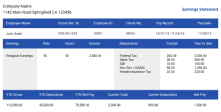
Here's how to calculate Box 1 on a W2 using nothing but your final paystub of the year, mostly already done for you.
- Grab your final paystub of the year, not just any paystub. Only the last one shows your full year-to-date totals. Skip multiplying one pay period by 26 or 12 pay periods; the YTD totals already reflect every raise, bonus, and mid-year benefit change.
- Find your YTD gross pay, total pay before any deductions, usually near the top of the YTD column.
- Subtract pre-tax deductions that lower Box 1: traditional 401(k)/403(b) contributions (2026 limit $24,500), Section 125 premiums, HSA contributions, transit benefits, and dependent care FSA (2026 limit $7,500/household).
- Add back anything that raises Box 1. Employer-paid GTL over $50,000 and tuition assistance over $5,250 are imputed income; they get added, not subtracted. Roth 401(k) contributions stay in Box 1 too, since they're already taxed.
- Skip true non-taxable items, like most reimbursements and certain disability payments; they were never part of your taxable wages.
- Compare your result to your W2 once it arrives. A small gap is normal from rounding; a large one is worth a call to payroll.
Prefer to skip the math? Create a W2 form directly and let the calculations run for you.
Worked Example: How to Calculate Box 1 on a W2
Here's how one final paystub of the year turns into five W2 boxes, starting from total gross pay and using 2026 limits.
| From Your Paystub | Amount | Affects |
|---|---|---|
| YTD gross pay | $62,400 | Starting point |
| Minus traditional 401(k) | -$6,240 | Lowers Box 1 only |
| Minus Section 125 health premium | -$1,200 | Lowers Box 1, 3, and 5 |
| Plus GTL imputed income | +$52 | Raises Box 1, 3, and 5 |
| Box 1 (federal taxable wages) | $55,012 | |
| Box 3 (Social Security wages) | $61,252 | |
| Box 4 (Social Security tax, 6.2%) | $3,798 | |
| Box 5 (Medicare wages) | $61,252 | |
| Box 6 (Medicare tax, 1.45%) | $888 |
Box 1 ($55,012) is lower than Box 3 and 5 ($61,252) here. That $6,240 gap is the 401(k): it lowers federal taxable wages, but Social Security and Medicare still tax it. Section 125 and GTL affect all three boxes equally, so they don't create a gap on their own.
What Are Social Security Wages on a W2?

Social Security wages appear in Box 3 of your W2: earnings subject to the 6.2% Social Security tax, up to the 2026 wage base of $184,500. Unlike Box 1, Box 3 isn't reduced by traditional 401(k) contributions, which is why the two boxes often differ.
Box 4 shows the actual tax withheld: 6.2% of Box 3, capped at $11,439 for 2026. Once you hit that cap, withholding stops; a $0 there on your last paystubs isn't an error.
What Is Medicare Wages and Tips on a W2?
Box 5 works like Box 3, but with no wage cap; every dollar is taxed at 1.45%, shown in Box 6. Above $200,000 in a year, your employer also withholds an Additional Medicare Tax of 0.9% on the amount over that.
Why Is Box 1 and 3 Different on a W2?
Box 1 and Box 3 differ because pre-tax retirement contributions, like a traditional 401(k), lower federal taxable wages (Box 1) but not Social Security wages (Box 3). A Box 3 figure capped near $184,500 is the 2026 Social Security wage base at work.
A mismatch usually traces back to one of a few things: a 401(k) that only lowered one box, a mid-year raise that crossed the wage base, or GTL that didn't get added back. Two employers each withholding separately can also cause it. If none of those fit, ask payroll to walk through the numbers.
What Does Box 16 "State Wages, Tips, Etc." Mean?
Box 16 is your state's version of Box 1, and it can differ again. Some states tax pre-tax benefits the federal government doesn't; Pennsylvania, for example, doesn't treat a 401(k) as pre-tax, so Box 16 there often runs higher. Worked in more than one state? You'll see a separate Box 16 line for each.
W2 vs. Paystub: Why the Numbers Don't Match
Your last paystub and your W2 rarely match exactly, and that's normal. Paystubs run on pay periods; your W2 runs on Box 1's tax definition. Two things drive most of the gap. First, the pay-date rule: a check dated in early January but earned in December counts toward whichever year it was paid. Second, paystub gross pay and W2 wages simply aren't measuring the same thing.
How to Read Your W2 Gross Income
Your W2 doesn't have a line labeled "gross income." It has Box 1 (federal taxable wages) and Box 3 or 5 (Social Security or Medicare wages), each a different slice of your pay. For full gross pay with nothing subtracted, your final paystub is still the better source.
How to Calculate Box 1 on a W2: Quick Recap
Start with your final paystub's YTD gross pay. Subtract traditional pre-tax deductions like a 401(k) or Section 125 premiums, then add back anything like GTL imputed income. That total is Box 1. Once you know how to calculate Box 1 on a W2 this way, the rest of your W2 follows the same paystub logic. Still missing the actual form? Here's how to get a copy of your W2 online.
For Employers: Getting Box 1 Right in 2026
If you run payroll, check a few 2026 details before issuing W2s. Qualified tips and overtime count as regular wages in Box 1, 3, and 5, even though employees can now deduct a portion on their own returns. Report tips with code TP and overtime with code TT in Box 12, plus a tipped occupation code in Box 14b. Run GTL and other fringe benefits through your last payroll, not as a manual fix. W2s are due by February 1, 2027, since January 31 falls on a Sunday.
You Might Also Like
- What Does a 1099 Pay Stub Look Like?
- How to Get a W2 From a Previous Employer
- 1099 Contractor Pay Stubs
- 6 Ways to Prove Your Self-Employed Income as a Contractor
- Form W2 Creator: Frequently Asked Questions
Conclusion
You don't need your W2 in hand to calculate Box 1 on a W2. Your final paystub already has the pieces: YTD gross pay, pre-tax deductions, and anything like GTL that gets added back in.
Need a paystub to work from, or one to create for a lease, loan, or new job? Use our pay stub generator to put one together in a couple of minutes.