Our customer support is available 24/7:

Create your 1098-T online in minutes. Accurate, print ready and hassle free.
Rated 4.4/5 (770+ reviews) 35+ tax forms No subscription required
A form showed up from your school, or maybe it never showed up at all, and now you are trying to work out what a 1098-T is and whether you need it before you file. This is easier than it looks. The 1098-T form is your Tuition Statement, and it reports what was paid toward your tuition and what you received in scholarships. It is not proof of income, so if earnings are what you actually need to document, a pay stub is the form that does that job. That single page is often what stands between you and a tax credit worth up to $2,500. Below: what the form is, how to get your copy, how to check it for mistakes, and what it is worth at tax time. If you work in a school business office, there is a section for you near the end.
A 1098-T form is the Tuition Statement your college or university sends you each year. It reports how much was paid toward qualified tuition and fees, plus any scholarships or grants you received. Your school files it with the IRS, and you use your copy to claim an education tax credit.
People search this one in every possible spelling. Some type what is a 1098 T form, others what is 1098-T, what is a 1098-T form, or just what is a 1098t. However you type it, the 1098-T tax form is the same document, and the IRS calls it form 1098-T. It is an information return, which means an organization files it to report something about you, rather than something you fill out and mail in yourself.
Two things this school tax form is not. It is not a bill, so nothing is due because you received one. And, as mentioned above, it is not proof of income: a 1098-T reports tuition and scholarships, not wages, so it will not help you show earnings for an apartment or a loan. If you are sorting out which document does what, pay stubs and taxes covers how the two connect.
Eligible educational institutions - colleges, universities and vocational schools - for each student with reportable tuition transactions.
The student (and, practically, the family), who uses it to claim education credits on the 1040.
A real-world example: A training institute's student paid $6,800 of qualified tuition and received a $1,500 grant. The 1098-T reports both, and the student's return does the credit math.
Enter your
information
Preview
your form
Download
your form
Student copies of the 1098-T are due by January 31, 2027; the IRS copy follows on the information-return schedule.
Here is the part that trips people up. Only an eligible educational institution can file Form 1098-T with the IRS. That comes from Section 6050S of the tax code, and it applies to the school, not to you. Your school files Copy A with the IRS and sends you Copy B for your records. You never submit this college tax form yourself.
Not every student gets one. Your school generally does not have to issue a 1098-T if:
Most students never get a paper copy anymore, which is exactly why so many think theirs is missing. There are three ways to get it.
Check your student portal or delivery vendor first. Many colleges do not host the form themselves. They hand delivery to a third party, and Heartland ECSI is one of the most common. Log in to your student account or tax document page and follow the link.
Check the mailing address on file. If you never consented to electronic delivery, your school mails Copy B to the address it has for you. If you moved after graduation, that is usually where it went.
Ask the bursar or registrar directly. A short email will get you a reissued copy. It works much like getting a copy of your W-2 online.
One detail explains a lot of missing forms: electronic delivery is opt-in. Schools need your consent before skipping the paper copy, so if you clicked through a consent screen at registration and forgot, your form is sitting in a portal waiting for you. If nothing has arrived by early February, check the portal, then the bursar.
Usually yes. Getting financial aid does not disqualify you, and your grants and scholarships simply show up in Box 5 of the form. The exception is when scholarships or waivers covered all of your qualified tuition and fees, since your school may not be required to issue a 1098-T at all.
What matters is how the two numbers relate. Box 5 is subtracted from Box 1 when you work out an education credit, so if your scholarships were larger than your tuition, there may be nothing left to claim a credit against. The leftover amount can even count as taxable income, which surprises a lot of students. If your aid covered tuition but you paid required fees out of pocket, that gap is still yours to claim. If you are also wondering whether FAFSA aid has to be paid back, that is a separate question.
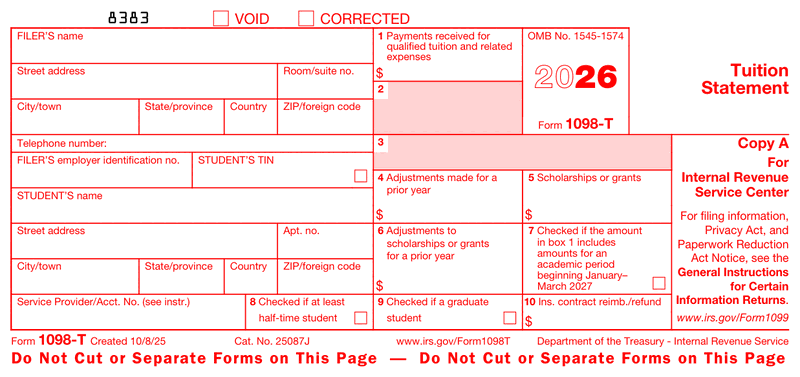
Most guides reprint the IRS instructions word for word. Here is the same information in a form you can actually scan. Whether your copy is labeled form 1098 T, 1098t form, or 1098t tax form, the boxes are identical.
| Box | What it shows | Why it matters to you |
|---|---|---|
| 1 | Payments received for qualified tuition and fees | The starting number for any education credit |
| 2 | Reserved for future use | Blank, ignore it |
| 3 | Reserved for future use | Blank, ignore it |
| 4 | Adjustments for a prior year | May mean repaying part of an earlier credit |
| 5 | Scholarships or grants | Subtracted from Box 1 when figuring your credit |
| 6 | Adjustments to prior-year scholarships | Can change a prior year's return |
| 7 | Checkbox: Box 1 covers a term starting January to March | Explains a Box 1 that looks too high |
| 8 | Checkbox: at least half-time student | Required for the American Opportunity Credit |
| 9 | Checkbox: graduate student | Graduate students use the Lifetime Learning Credit |
| 10 | Insurance contract reimbursement | Rare, filed by insurers not schools |
This is the reason the form matters. There are two credits, and your 1098-T supplies the numbers for both.
The American Opportunity Tax Credit is worth up to $2,500 per student per year. It covers the first four years of undergraduate study, requires at least half-time enrollment, and 40% is refundable, meaning up to $1,000 back even if you owe no tax.
The Lifetime Learning Credit is worth up to $2,000 per tax return. There is no limit on how many years you claim it and no half-time requirement, which makes it the usual choice for graduate students and anyone taking a class or two. It is nonrefundable, so it can cut your tax bill to zero but not below.
You claim either on Form 8863, and you cannot take both for the same student in the same year. Who claims it matters: if someone claims you as a dependent, they take the credit and you do not, even if you paid the tuition yourself. If nobody claims you as a dependent, the credit is yours. One eligibility condition catches people out: the student needs a Social Security Number issued by the due date of the return to claim either credit, so an ITIN alone does not qualify. The American Opportunity Credit also requires the school's EIN on Form 8863, which is printed on your 1098-T. Credits like these flow through to Schedule 3 on your return. Qualified expenses mean tuition and required fees. Room, board, transportation, and insurance do not count.
Spend two minutes here before you file, because fixing it later means amending your return.
If Box 1 looks wrong, check Box 7 first. Box 1 counts payments received during the calendar year, so spring tuition paid in December lands in the earlier year. That is normal. If something genuinely does not match, ask your bursar for a corrected form before you file, not after.
Three dates matter for the 2026 tax year, and only the first is really about you.
If your form is late, the penalties fall on the institution, not on you. You are still expected to file an accurate return, so if February 1 passes with nothing in your portal, start asking. It is worth knowing what happens if you don't file taxes before the deadline gets close.
Let me be straight with you here, because it changes what this tool is actually good for. Only your school can issue an official 1098-T and file it with the IRS. A generator cannot change that, and a self-made copy is not a substitute for the statement your school files. If you are a student and yours is missing, the section above is the route that works.
Where a 1098 T generator genuinely helps is narrower. School business offices preparing tuition statements can lay out each box correctly instead of wrestling with formatting. And if you want a clean reference copy of your own numbers for a file or a financial aid appeal, a formatted version keeps it organized.
You fill the fields in on screen, preview the result, then download a formatted PDF to print or save. You pay only at download, and there is no subscription.
The 1098-T is reissued every year, and the year is printed right on the copy your school files. So when you search for a 1098-T form 2025 or a 1098-T form 2026, you are asking a real question. Those are two different documents, and the one you want is the one matching the tax year you are filing for.
For most students that is the current season. If you are amending an earlier return, or you only just realized you never claimed a credit you were entitled to, you need the older form instead. School portals usually keep several years of statements available, so pull the year you actually need rather than the newest one sitting at the top.
The good news is that almost nothing changed between the two. On the 2026 version the address fields were separated into individual entry boxes, and the e-file threshold and IRIS items carried over unchanged. No box renumbering, no threshold change, no rule change, no deadline change. Everything above about Box 1 and Box 5 applies to either year.
| Tax year | Your copy due from the school | School files on paper | School files electronically |
|---|---|---|---|
| 2025 | February 2, 2026 | March 2, 2026 | March 31, 2026 |
| 2026 | February 1, 2027 | March 1, 2027 | March 31, 2027 |

4.4 out of 5.0 stars on 717 reviews
No. You do not attach the form itself, and your school already filed its copy with the IRS. You use the numbers from your copy to complete Form 8863 if you are claiming an education credit, then keep the 1098-T with your records.
Check your school's student portal or its tax document vendor first, since most schools deliver electronically now. If it is not there, confirm the mailing address on file and contact the bursar's office. Some students are legitimately exempt and never receive one.
Log in to your student account and look for a tax documents or 1098-T section. Many schools route this through a third-party service such as Heartland ECSI. You may need to consent to electronic delivery before the form becomes visible to you.
Box 1 reports payments your school received during the calendar year, not what you were billed. If you paid spring tuition in December, it counts in that earlier year. Check Box 7, which is ticked when Box 1 includes a term starting early the next year.
In most cases yes, and your aid appears in Box 5 rather than keeping you from receiving the form. The exception is when scholarships or tuition waivers covered all of your qualified tuition and fees, because your school may not be required to issue one.
Fill out our contact form, and we will get back to you as soon as we can!
Contact us Hi! How can I help you?  Kris
Kris