Our customer support is available 24/7:

Create your Schedule E online in minutes. Accurate, print ready and hassle free.
Rated 4.4/5 (770+ reviews) 35+ tax forms No subscription required
Rent hit your account this year, or a Schedule K-1 landed in your mailbox, and now there's a tax form in front of you that you've never seen before. That's Schedule E, and it's friendlier than it looks.
Schedule E (Form 1040) is where you report income and loss from rental property, royalties, and your share of a partnership, S corporation, estate, or trust. Our Schedule E generator handles the math for you. Most people filing a schedule e tax form are regular landlords with one property. The version you'll file this season covers tax year 2025.
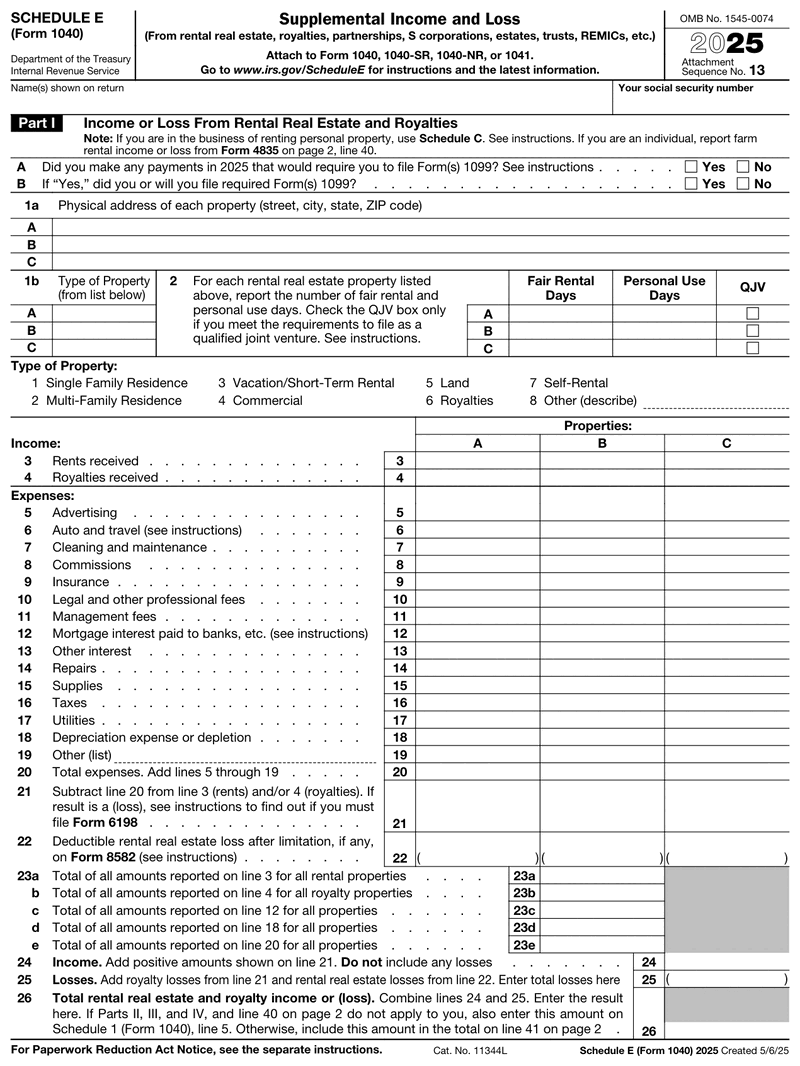
Schedule E (Form 1040) is the IRS tax form used to report supplemental income and loss from rental real estate, royalties, partnerships, S corporations, estates, and trusts. It attaches to your Form 1040, and most filers only complete Part I, the rental real estate and royalties section.
"Supplemental" is the IRS's word for money that didn't come from a paycheck. Nobody withheld tax from it before it reached you, so the 1040 schedule e itemizes it rather than burying it in one line. You'll see it called the irs schedule e in the official IRS instructions, and the E schedule in most tax software menus. Same form either way.
You need to file Schedule E if you earned income from rental property, royalties, a partnership, an S corporation, an estate, or a trust during the tax year. That includes first-time landlords with one rental and anyone who received a Schedule K-1. Real estate dealers file Schedule C instead.
That's a wider group than people expect. Renting out a condo you moved away from counts, hosting a spare house as a short-term rental usually counts, and so do royalties on a book, a song, or mineral rights.
Skip the schedule e form if your only income came from a W-2 job. Short-term hosts providing substantial services, like daily cleaning or meals, file Schedule C instead and follow self-employment tax rules.
Enter your
information
Preview
your form
Download
your form
Schedule E follows your 1040: mid-April 2027 for 2026, or October with a 4868 extension.
Schedule E covers five income types: rental real estate, royalties, partnerships, S corporations, and estates or trusts, plus REMIC interests. You report gross rent received, subtract allowable expenses like repairs, insurance, mortgage interest, and depreciation, and you are taxed on the net rental income, not the full rent.
That distinction saves real money. Say you rented a house all year at $2,000 a month, so $24,000 in gross rent. Subtract $1,800 in repairs, $2,400 in management fees, $9,000 in mortgage interest, $1,500 in insurance, and $6,000 in depreciation, and your schedule e rental income drops to $3,300. You're taxed on $3,300, not $24,000.
Schedule E income can also go negative. A new roof or a long vacancy can produce a loss, and that loss may offset other income depending on how involved you are.
The form runs five parts, and you'll leave most of them blank.
Blank sections are normal and won't flag your return.
Work through Part I of the form 1040 schedule e in this order. These schedule e instructions stick to the lines landlords actually use.
Enter the property address on line 1a, then pick a type code on line 1b: 1 single family, 2 multi-family, 3 vacation or short-term rental, 4 commercial, 5 land, 6 royalties, 7 self-rental, 8 other.
Line 2 deserves a pause. Fair rental days and personal-use days go in separate boxes and aren't interchangeable. A weekend at your own beach rental is personal use, and misreporting it changes what you can deduct.
Line 3 takes the rent you actually collected, line 4 takes royalties. Report what reached your account, not what was owed.
Each category gets its own line: advertising, auto and travel, cleaning, insurance, legal fees, management fees, mortgage interest, repairs, supplies, taxes, and utilities. Line 18 is depreciation, spread over 27.5 years for residential rentals.
Line 20 totals expenses, line 21 subtracts them from income, and line 22 handles any deductible loss. Repeat per property, then move to Part V.
One habit makes next April painless: log rent, expenses, and days rented monthly, and photograph receipts into a cloud folder as you go.
Need a clean copy? The generator handles lines 20 through 22 for you and totals each property as you type.
How involved you are changes what you can deduct in a loss year. Active participation means you make the real decisions: approving tenants, setting rent, authorizing repairs. You don't have to manage the place yourself.
Active participants can generally deduct up to $25,000 of rental losses against other income. That allowance shrinks once your modified adjusted gross income passes $100,000 and disappears at $150,000. Passive investors carry the loss forward instead.
Most sch e errors come from a few predictable places.
Caught something after filing? File Form 1040-X with a corrected Schedule E attached.
A few forms travel alongside the schedule e 1040, each with a clear trigger:
There's no signature line on Schedule E. You sign your Form 1040, and that covers every schedule attached to it.
Your schedule e form 1040 is due with your return on April 15, or the next business day when the 15th falls on a weekend or holiday. An extension moves the paperwork to October 15, but tax owed is still due in April.
E-filing attaches the schedule automatically. Paper filers mail it with the 1040 to the IRS address for their state. Confirm the current version on the IRS Schedule E page, or pull the blank form PDF.
Our schedule e generator keeps you out of a fillable PDF that fights back:
Everything calculates automatically, so lines 20 through 22 take care of themselves.
Schedule E is reissued every year, so match the version to the tax year your rent came in, not the year you sit down to file. Rent you collected in 2025 belongs on the 2025 Schedule E. A search for "schedule e form 2026" points to the version you will file next spring, for the rent landing in your account right now.
| Tax year 2025 | Tax year 2026 | |
|---|---|---|
| Due with your Form 1040 | April 15, 2026 | April 15, 2027 |
| With a Form 4868 extension | October 15, 2026 | October 15, 2027 |
| Business mileage rate | 70 cents per mile | 72.5 cents January 1 through June 30, 2026, then 76 cents from July 1 |
The mileage rate is the row that catches landlords out. For 2026 the IRS revised it mid-year, so a drive to your rental in March is deducted at a different rate than the identical drive in September. Date every entry in your mileage log and total the two halves separately.
One rule holds steady across both years: 100% bonus depreciation applies to qualified property acquired after January 19, 2025, so it is on the table whichever schedule you are filling in.

4.4 out of 5.0 stars on 717 reviews
It is the attachment where you list income and loss that did not come from a job or a business you actively run. Think rent, royalties, and your share of a partnership. Your total flows to Schedule 1 and then onto your Form 1040.
Leaving Schedule E off means your rental or royalty income goes unreported, which can trigger failure-to-file and failure-to-pay penalties plus interest. You also lose the expense deductions that would have reduced the tax owed, so the bill is usually larger than the rent you left off. Amending with Form 1040-X fixes it, and the sooner you file, the less interest accrues.
Yes, but only on what you keep. You report the gross rent you collected, then subtract allowable expenses such as repairs, property management fees, mortgage interest, insurance, and depreciation. Tax applies to the net figure left over, which is often much smaller than the rent you banked.
Yes. When you e-file your return, Schedule E is transmitted with your Form 1040 automatically, so there is nothing extra to send. Paper filing is still allowed too: print the completed schedule and mail it with your 1040 to the IRS address for your state.
Yes. Both point to one document, the supplemental income and loss attachment that goes with your Form 1040. You will see the short version in tax software menus, IRS worksheets, and accountant emails, but there is no separate filing behind that abbreviation.
Fill out our contact form, and we will get back to you as soon as we can!
Contact us Hi! How can I help you?  Kris
Kris