Our customer support is available 24/7:

Build your 1099-NEC online in a few clicks. Fast, accurate and error free.
Rated 4.4/5 (770+ reviews) 35+ tax forms No subscription required
You paid a contractor last year, and now you need to send them a 1099-NEC. Or one just landed in your mailbox and you are trying to work out what it means for your taxes. Either way, this is probably not something you do every day, and that is completely normal. The good news is that you can fill one out at PayStubCreator.net in a couple of minutes. Form 1099-NEC is a single page, most of it is names and addresses, and there is really only one number doing the heavy lifting.
A 1099-NEC is the IRS form businesses use to report nonemployee compensation, meaning payments of $2,000 or more made to an independent contractor during the tax year. The payer sends Copy A to the IRS and Copy B to the contractor by January 31.
So what is a 1099-NEC in plain terms? It is an information return. It does not calculate anyone's tax bill; it just tells the IRS how much a business paid a particular contractor during the year. NEC stands for nonemployee compensation, and you may see the 1099-NEC form written without its hyphen, as 1099NEC, in some payroll systems.
It is one of several forms in the 1099 form family, each covering a different kind of payment. The IRS brought this one back in 2020. Before that, contractor pay sat in Box 7 of the 1099-MISC. Splitting it out gave those payments their own earlier deadline, which is why the 1099 NEC form now stands on its own.
You need to file a 1099-NEC if your business paid an independent contractor, freelancer, or other nonemployee $2,000 or more in total during the tax year. That threshold rose from $600 for payments made after December 31, 2025, and it is indexed for inflation after 2026. The $2,000 is cumulative across all payments to that person, not per invoice. Employees get a W-2 instead.
That cumulative part trips people up more than anything else here. Pay the same contractor $800 in March, $700 in July, and $650 in November, and that is $2,150 for the year, so they need a form. Plenty of first-time filers assume each invoice has to clear the threshold on its own. It does not.
You generally do not file for employees, who get a W-2, or for most payments to corporations, though attorneys are a notable exception. Payments made by credit card or through a platform like PayPal are also excluded, because the processor reports those on a 1099-K.
On the receiving end, the independent contractor tax form in your hands is a record of what that client told the IRS they paid you. If you landed here searching for what is 1099-NEC because one turned up unexpectedly, that is the whole answer: it is a copy of a report, not a bill, and nothing is due just because it arrived. Check it against your own books before you file. Contractors get no payroll stub with theirs, so it helps to know how an independent contractor pay stub works and what a 1099 pay stub looks like.
Enter your
information
Preview
your form
Download
your form
| What | When | Worth knowing |
|---|---|---|
| Send Copy B to your contractor | January 31, 2027 | Mail or an agreed electronic delivery |
| File Copy A with the IRS | January 31, 2027 | Same date on paper or e-file - no automatic extension |
| Correct a filed 1099-NEC | As soon as the error surfaces | File a corrected copy; interest-free is the goal |
Dates falling on a weekend or legal holiday shift to the next business day.
Nonemployee compensation is money paid to someone who is not your employee for services they performed for your business: freelance work, consulting fees, contractor labor, or professional services. It does not include employee wages, which go on a W-2, or personal payments unrelated to your business.
A few examples make it click: a freelance designer who built your logo, a consultant you paid for a strategy session, a subcontractor who finished a job you could not cover alone, or an attorney who is not on your payroll.
What does not count: wages paid to an employee, which belong on a W-2 with taxes withheld, payments for physical products rather than services, and anything personal. Paying your neighbor's kid to mow your lawn is not a business expense.
You will also see it written as non employee compensation, as two words, and it means the same thing. The nonemployee compensation meaning comes down to one question: did you pay this person for work they did for your business, and were they not your employee?
The 1099-NEC reports nonemployee compensation paid to contractors, while the 1099-MISC reports other payments like rent, prizes, and royalties. Before 2020, both went in Box 7 of the 1099-MISC. The IRS split them so contractor pay has its own form and its own January 31 deadline.
| 1099-NEC | 1099-MISC | |
|---|---|---|
| What it reports | Pay for services from contractors and freelancers | Rent, prizes, awards, royalties, other income |
| Who receives it | Independent contractors, freelancers, subcontractors | Landlords, prize winners, royalty recipients |
| Deadline | January 31 | February 28 on paper, March 31 if e-filed |
Choosing between 1099 MISC vs 1099 NEC comes down to what the payment was for. Did you pay someone for work they did? That is the NEC. Did you pay rent on your office or hand out a cash prize? That is the MISC. If it turns out the MISC is the one you need, here is how to issue a 1099-MISC.
Before 2020 there was no choice to make, because contractor pay sat inside the 1099-MISC. The IRS pulled it out because that box had an earlier deadline than the rest of the form.
Gathering four things up front turns this into a five-minute job:
Here is the habit that saves the most trouble: ask every contractor for a completed fillable W-9 before their first payment, not in January. A verified taxpayer identification number on file means no year-end chasing, and no backup withholding at 24% because their TIN is missing.
The official 1099 NEC instructions run several pages, but the form itself is short. Work through it in this order:
The account number field is optional unless you are filing more than one form for the same contractor. The full 1099-NEC instructions from the IRS cover rarer edge cases.
The rule is the same every year: Copy A goes to the IRS and Copy B goes to the contractor by January 31 following the tax year. If January 31 falls on a weekend or a federal holiday, you have until the next business day. That exception actually applies this time: January 31, 2027 falls on a Sunday, so forms covering the 2026 tax year are due Monday, February 1, 2027. Do not get used to the extra day, because it disappears in any year the date lands midweek.
Missing it costs money. Late-filing penalties start around $60 per form if you correct it quickly and climb toward $340 per form the longer you wait, with a steeper penalty and no annual cap for intentional disregard. The IRS adjusts these amounts each year, so check the current figures if you are behind.
Most filing problems come down to the same handful of slips:
The form comes in several copies, and each one has somewhere specific to be:
You can file 1099 forms on paper or electronically, but the count decides for you. If your information returns add up to 10 or more, e-filing is mandatory. That count is aggregated across every type of return you file, so your W-2s, 1099-MISCs, and 1099-NECs all add into the same total. Ten 1099-NEC forms is not the trigger; ten forms of any kind is.
One trap worth knowing about: the red-ink Copy A that goes to the IRS on paper has to be machine scannable, so a version printed on a home printer can be rejected outright. E-filing sidesteps that problem completely, and the IRS runs a no-cost portal for it called IRIS, the Information Returns Intake System, which takes up to 100 returns at a time. If you have filed before and remember the older FIRE system, note that the IRS is retiring it, and IRIS becomes the only electronic filing option from January 1, 2027. Even if you are under the 10-form threshold, e-filing is usually faster and gives you a confirmation you can save.
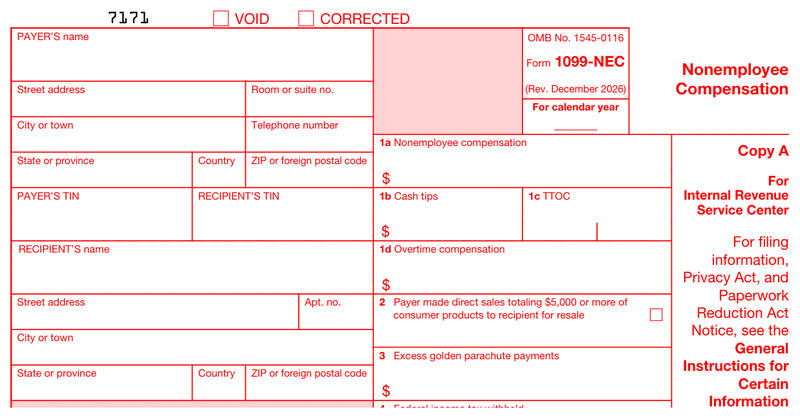
You do not need accounting software or a tax preparer to handle a few forms. Our 1099 NEC generator lays the document out for you so you are not fighting with a blank PDF:
The whole thing takes a couple of minutes per contractor. Preview it free, pay only when you download, and there is no subscription to cancel later. You get a clean, correctly formatted document you can save, reuse next January, and hand straight to the person who earned it.
There is no annual Form 1099-NEC. The IRS does not print a fresh version every January the way it does for a 1040. It issues the form once and keeps it in service until a superseding revision comes out, so when you search for a 1099-NEC 2025 or a 1099-NEC 2026, the year you are typing refers to the tax year of the payments, not to two different documents.
What does matter is which revision you pick up. The current one is the December 2026 revision, and it is the one to use when you report tax year 2026 payments in early 2027. Do not use it for earlier years. Tax year 2025 payments belong on the earlier revision, and those copies were due February 2, 2026.
The December 2026 revision is not a reprint with a new date on it. It is where the $2,000 reporting threshold lands, for tax years beginning after 2025. It adds box 1b for cash tips, box 1c for the Treasury tipped occupation code, and box 1d for qualified overtime compensation. Excess golden parachute payments moved onto this form from the 1099-MISC and now sit in box 3. Payer and recipient address fields were also split into individual entry boxes, so a form you copied from last year will not line up.

4.4 out of 5.0 stars on 717 reviews
Two separate costs are worth pulling apart here. The IRS charges nothing for the document itself, and its e-filing portal does not charge either. Our 1099 NEC generator is a paid tool: fill your details in and preview it free, then pay once at download. There is no subscription and no watermark, and what you get is a properly formatted document ready to send to your contractor or keep for your records.
It is money you were paid for services as a contractor rather than as an employee, and it sits in Box 1a of the form. No taxes are withheld from it, so you are responsible for your own income tax and self-employment tax on that amount when you file your return.
It is Box 1a on the form, and it covers payment for work performed by anyone outside your payroll: freelancers, consultants, subcontractors, and other independent contractors. This is the single most common entry on the whole form, and for most filers it is the only dollar figure they enter.
NEC stands for nonemployee compensation. The 1099 NEC meaning is straightforward: it is the form a business uses to tell the IRS how much it paid a contractor during the year, so the IRS knows to expect that income on the contractor's return.
The IRS charges a per-form penalty that increases the longer you wait, starting at roughly $60 per form for a quick correction. Filing late is still far better than not filing, and correcting an error promptly keeps the penalty at the lowest tier.
You can print Copy B for your contractor and Copy C for your files. Copy A, the red-ink version for the IRS, has to be machine scannable and is often rejected when printed at home, which is why e-filing that copy is the safer route.
Check the amount against your own records first. If it matches, report that income on your tax return, usually on Schedule C. If it is wrong, contact the payer and ask for a corrected form before you file rather than after.
No form is required below $2,000 in total payments to that contractor for the year. The contractor still owes tax on the income, and you can still deduct the expense, but the reporting requirement does not kick in until the cumulative total reaches $2,000.
Fill out our contact form, and we will get back to you as soon as we can!
Contact us Hi! How can I help you?  Kris
Kris