Our customer support is available 24/7:

Make your W9 form in minutes. Simple to use, accurate and ready to download.
Rated 4.4/5 (770+ reviews) 35+ tax forms No subscription required
Someone just asked you for a W9 form. Maybe it was a new client, a gig platform, or a bank, and they need it before they can pay you. The good news is that the form is short, and you can fill it out, sign it, and download it in a couple of minutes. When you're ready, our fillable W9 generator at PayStubCreator.net handles the formatting for you so you can send a clean PDF right back. You preview your form free and pay only when you download it, with no subscription.
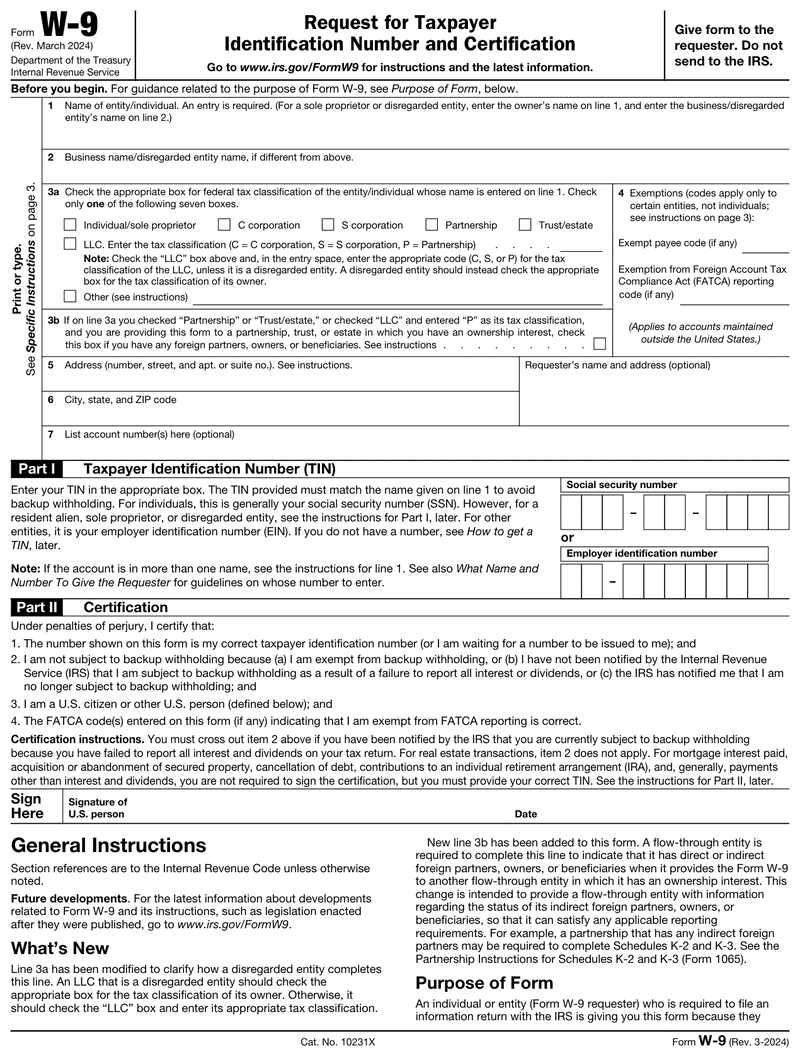
A W9 form is an IRS document called the Request for Taxpayer Identification Number and Certification. You fill it out to give a business your legal name and taxpayer ID, either your SSN or EIN. They use it to report the money they pay you, usually on a 1099.
People often ask what is a w9 tax form and whether it’s different from a plain W-9. It’s not: "W-9" is simply the IRS's label for this one document, which is officially titled Form W-9. So whats a w9 in everyday terms? It’s how a company collects your correct taxpayer information before they pay you. Unlike a tax return, you don’t send the w9 tax form to the IRS yourself. You hand it back to whoever requested it, and they keep it on file. The irs w9 costs nothing to get from the IRS, and it doesn’t expire unless your details change.
You need to fill out a W9 if you are an independent contractor, freelancer, gig worker, or subcontractor getting paid by a business. Platforms like Uber, DoorDash, Upwork, and Fiverr ask for one before your first payment, and so do many clients and vendors.
Construction subcontractors and staffing-agency placements run into the same request. If a business expects to pay you $2,000 or more in a year, it generally needs a completed form w9 on file. That threshold rose from $600 to $2,000 for payments made after December 31, 2025, and it is indexed for inflation after 2026. That way, it can send you a 1099 at tax time. Employees on a regular payroll fill out a W-4 instead, not a W-9.
Enter your
information
Preview
your form
Download
your form
| What | When | Worth knowing |
|---|---|---|
| Send it to whoever requested it | Before your first payment | No IRS filing - the requester keeps it on file |
| Refresh after a name, TIN or entity change | With your next invoice | Clients pay against the version they hold |
| The 1099-NEC built from your W-9 | January 31, 2027 | Why the details need to match IRS records |
Dates falling on a weekend or legal holiday shift to the next business day.
Filling out the W9 takes about two minutes once you have your details ready. Here’s what each part asks for:
One quick tip from building this tool: the errors we guard against most are people entering both an SSN and an EIN, leaving the tax classification blank, and mismatching the name and business-name lines. Double-check those three before you send.
Once the fields are filled in, you can sign your W9 right on the screen, with no printing or scanning required. Then download it as a clean, fillable w-9 form pdf that’s ready to email or upload wherever the payer requested it. Ready to start? Our W9 generator fills in the formatting for you, so you’re not retyping a blank w9 by hand. You can preview the finished form free and pay only when you download it.
One habit that saves gig workers a lot of time: fill out and download your w9 pdf from your phone between jobs, then save it to Google Drive or Dropbox. The next time a client asks, you resend the same file in seconds. Because the W-9 form holds your SSN or EIN, only share the completed document through secure email or the payer's official portal.
A w9 form carries your full legal name, your address, and your SSN or EIN. That is everything someone needs to open credit in your name, so it is worth ten seconds of checking before you send yours anywhere.
Ask yourself three things. Do you actually work for this company, or have you agreed to? A W-9 request should follow a real conversation about real work, never arrive cold. Does the request come from a company domain rather than a personal Gmail or Yahoo address? And does the person asking match someone you have spoken to?
Two warning signs come up again and again. The IRS never emails you asking for a w-9 form, so any message claiming to be from the IRS is fake. And a real payer asks only for the W-9 itself, not for your bank login, a copy of your driver's license, or a fee to "release" your payment.
When the request checks out, send the completed form through the payer's own portal if they have one. If they do not, use secure email or a shared drive link rather than a plain attachment, and never post it in a group chat or a job board message. If you are unsure, call the company on a number you looked up yourself and confirm who wants the form.
Sending the form is not a tax bill, and nothing is withheld from your pay because of it. Your payer files the w9 form away and uses it for one purpose: to report what they paid you.
If they pay you $2,000 or more across the year, they send you a 1099 in January and file a copy with the IRS. Below that, you may get nothing in the mail, and that catches people out. You still owe tax on the income whether or not a 1099 shows up, so keep your own record of what each client paid you.
Here is the part that surprises first-time contractors. No employer is taking tax out for you anymore, so the full amount lands in your account and the bill arrives later. Most self-employed people set aside roughly 25 to 30 percent of each payment and make quarterly estimated payments to the IRS in April, June, September, and January. Opening a separate savings account for that money is the simplest way to avoid a spring surprise.
One thing to watch: if the name and number on your w9 do not match IRS records, the payer may be told to start backup withholding at 24 percent of your payments. Getting the form right the first time is what keeps that from happening.
This one trips people up, so it is worth saying plainly: there is no annual W9. Unlike a W2 or a 1099, the W9 is not reissued each year. The current version is the one the IRS released in March 2024, and it is the correct form to hand over whether you are being paid in 2025, 2026 or later.
So if you searched w9 form 2025, w9 form 2026 or w9 2024, they all point at the same document. What matters is not the year on your search but whether your details are current. A W9 does not expire, but you do need to send a fresh one when your name, business name, address or taxpayer ID changes, or when your tax classification changes.
One practical note: what the year usually signals is the tax year your payer will report. A W9 you sign now feeds the 1099 they issue for the year they actually paid you, so keep a copy with your records for that year.

4.4 out of 5.0 stars on 717 reviews
The blank form itself never costs anything, since the IRS doesn’t charge for it. Our w9 generator is a paid tool: you fill it in and preview your finished form free, and you pay only when you download it. There’s no subscription, and the PDF you get has no watermark across it, so you can send it straight to any client or platform.
There is no separate w9 form 2026. The current version is the one the IRS released in March 2024, and it’s still what you use for the 2026 tax year. If you searched w9 2026 or 2026 w9 just to be safe, you’re in the right place. A w-9 form 2026 update has not replaced it, so always download the latest revision so a payer doesn’t reject an outdated form.
If you don’t return a requested W-9, the payer is required to start backup withholding, holding back 24% of your payments and sending it to the IRS. In plain terms, that’s the difference between a full invoice and getting only about three-quarters of it. Giving a missing or incorrect taxpayer ID can also trigger a $50 penalty.
Use one, not both. If you’re a sole proprietor without an EIN, use your Social Security Number. If you are a sole proprietor or a single-member LLC that has not elected corporate status, the IRS treats you as a disregarded entity: use your own SSN, or an EIN issued in your own name as a sole proprietor if you want to keep your SSN off the form. Do not use an EIN issued in the LLC's name. Only an LLC taxed as a corporation or partnership, or a corporation itself, uses the entity's own EIN.
The usual slip-ups are using a nickname instead of your legal name, checking the wrong federal tax classification, entering both an SSN and an EIN, forgetting to sign and date, and putting a business name on line 2 when you file as a sole proprietor with no DBA.
No. The form is for US persons, including citizens and resident aliens. If you’re a non-US contractor, you complete a Form W-8 (usually W-8BEN) instead. That form tells the payer you’re a foreign person and handles any tax-treaty benefits you may qualify for.
If you’re the one paying, ask for a completed form w-9 before you send the first payment. Have the contractor fill out and sign it, then keep it on file so you can issue an accurate 1099 at year-end. Never post it publicly, since it contains sensitive taxpayer information.
You fill out a W9 first, and the 1099 comes later. The W-9 collects your name and taxpayer ID, and the payer uses that information to prepare a 1099 form that reports how much they paid you during the year. One is the request, and the other is the report.
Fill out our contact form, and we will get back to you as soon as we can!
Contact us Hi! How can I help you?  Kris
Kris