Our customer support is available 24/7:

Build your Schedule Se online in a few clicks. Fast, accurate and error free.
Rated 4.4/5 (770+ reviews) 35+ tax forms No subscription required
You finished your Schedule C, you have a net profit sitting on line 31, and now a second form wants that same number. That form is Schedule SE, and it works out the Social Security and Medicare tax you owe when no employer withheld it for you. If you cleared $400 in net earnings, you have to file it, and PayStubCreator can generate it for you if you would rather skip the math.
Key Takeaways
• Schedule SE calculates Social Security and Medicare tax on self-employment income. - You file it once your total net self-employment earnings reach $400. - The self-employment tax rate is 15.3%, split into 12.4% Social Security and 2.9% Medicare. - Half of what you pay is deductible as an adjustment to income, which most filers miss.
Schedule SE (Form 1040) is the IRS schedule you attach to your return to calculate self-employment tax, the Social Security and Medicare tax that no employer withheld for you. You file it if your net self-employment earnings reached $400. The figure comes straight from your Schedule C line 31, and the tax rate is 15.3%.
When you work for someone else, your employer quietly splits those taxes with you and sends the money in on your behalf. Working for yourself, you cover both halves, and this self employment tax form is where that gets calculated. You may see it listed as the self employed tax form, the Schedule SE tax form, or 1040 Schedule SE, and they all refer to this same document. It attaches to your Form 1040, 1040-SR, or 1040-NR rather than being filed on its own, so there is no separate mailing or deadline to track. If you have been hunting for the correct tax form for self employed income, this is the one. Newer to all of this? Our plain-English guide to self-employed taxes covers the wider picture.
Self-employed people with $400 or more of net profit - freelancers, sole proprietors, farmers and most gig workers.
It attaches to your Form 1040 and files with it.
A real-world example: Your Schedule C shows $31,500 of profit. Schedule SE turns that into the self-employment tax line on your 1040 - and hands half of it back as a deduction.
Enter your
information
Preview
your form
Download
your form
Schedule SE follows your 1040: mid-April 2027 for 2026, or October with a 4868 extension. If the SE tax is significant, quarterly 1040-ES payments spread it through the year.
You must file Schedule SE if your total net self-employment earnings were $400 or more across all your businesses combined, not per business. That includes freelance work and gig income from platforms like Uber, DoorDash, Upwork, and Etsy. Church employee income uses a separate, lower threshold of $108.28.
That "combined" part trips people up. If you drove for DoorDash and made $250, then picked up $300 of design work on Upwork, you are at $550 and you file, even though neither one alone crossed the line. Income from Instacart, Fiverr, and Etsy sales counts the same way. It lands on Schedule C first as business income, and the net profit left after expenses is what flows onto your self employed tax return. A freelance tax form obligation follows the profit, not the paperwork your clients happened to send you, so you still report it even when no 1099 ever arrives. If you are unsure whether your work counts, start with how independent contractor pay is documented.
Self-employment tax comes to 15.3%, and it helps to see the two pieces separately. The Social Security portion is 12.4% and it only applies to the first $184,500 of net earnings for 2026, up from $176,100 in 2025. The Medicare portion is 2.9% and it has no cap at all, so it applies to every dollar of net self-employment profit you report. Once you pass that Social Security ceiling, the 12.4% portion drops off. If your net self-employment earnings also pass $200,000 (or $250,000 married filing jointly, $125,000 married filing separately), an extra 0.9% Additional Medicare Tax applies on top of the 2.9%. These are the same two taxes an employee sees withheld as FICA on a pay stub, just collected differently.
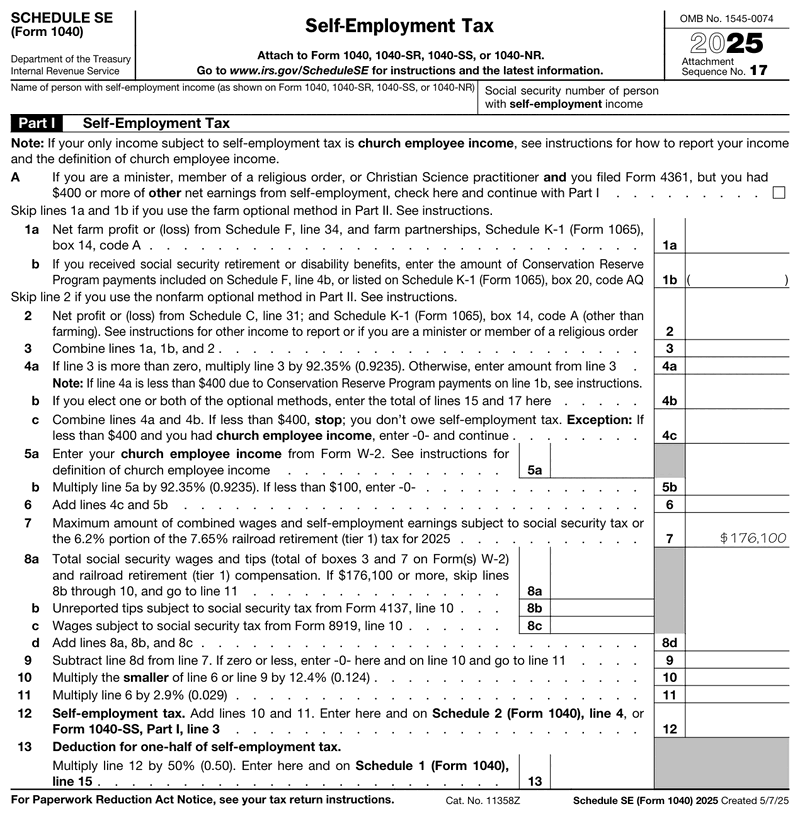
One detail catches nearly every first-time filer. You do not pay 15.3% on your full net profit. Line 4a multiplies your earnings by 92.35% first, which approximates the employer-side deduction a traditional employee never sees. On $50,000 of net profit, the tax applies to $46,175, not the full $50,000. You can confirm the current wage base directly on the Social Security Administration's contribution base page.
Most filers only need Part I of the Schedule SE form. Part II holds the optional methods for figuring net earnings, which mainly matter to farmers and to anyone having a weak profit year, and you can skip it unless one of those applies to you. The official Schedule SE instructions run long, so here is the path most people actually take:
Those last two lines send the same calculation to two different places, which is the part worth slowing down for. The official IRS Schedule SE instructions confirm the line references if you want to check your work.
Here is the piece almost nobody explains. Half of your self-employment tax comes back to you as a deduction, and you claim it whether or not you itemize.
The logic is straightforward. A traditional employer pays half your Social Security and Medicare tax and writes that off as a business expense. When you are self-employed you pay both halves, so the IRS lets you deduct the employer half the same way. It shows up on Schedule SE line 13, then moves to Schedule 1, line 15, where it reduces your adjusted gross income.
This is an adjustment to income, not an itemized deduction, so it lowers your taxable income even if you take the standard deduction. On $50,000 of net profit, the self-employment tax runs roughly $7,065, and about $3,532 of that becomes deductible. Of all the self employed tax deductions available to you, this one requires no receipts and no extra form. Fill the form out correctly and the number is simply there.
If you are working out how to file self employment taxes for the first time, the short answer is that the form rides along with your Form 1040 and follows the usual April filing date. It is not filed separately and has no deadline of its own.
The bigger risk is cash flow. Self-employment tax is not withheld from anything, so a full year of it lands at once unless you plan ahead. Take the figure the form produces, add your expected income tax, divide by four, and move that amount into a separate account each quarter. Estimated payments are due in April, June, September, and January. Skipping them can trigger an underpayment penalty even when you pay the full balance in April.
We build tools for exactly this kind of paperwork. Our Schedule SE generator handles the arithmetic and the line-to-line carries for you, which removes the errors we see most often. Filers forget to combine net earnings when they run two businesses. They transpose the figure coming off Schedule C line 31. They apply 15.3% to full profit instead of the 92.35% adjusted amount, and overpay. The tool catches all three, and the whole thing takes a couple of minutes from start to finish.
Schedule SE is reissued every year, and the year printed on it is the tax year of your income, not the year you file. "Schedule SE 2025" means the one you attach to the 2025 return you send in spring 2026, and "Schedule SE 2026" is the one you will use a year later. Pull the wrong year and line 7 caps your Social Security tax at the wrong number.
That cap is the figure on this form that actually moves. The 12.4% and 2.9% rates stay put.
| Tax year | Wage base on line 7 | Maximum Social Security part of SE tax | Attach to Form 1040 by | With Form 4868 |
|---|---|---|---|---|
| 2025 | $176,100 | $21,836.40 | April 15, 2026 | October 15, 2026 |
| 2026 | $184,500 | $22,878.00 | April 15, 2027 | October 15, 2027 |
Two things worth knowing before you file. The 2026 wage base is printed on the IRS draft of the form, so check it against the final version when that posts. And an extension only moves the filing date: your SE tax is still due April 15 regardless, so pay by then even if the paperwork goes in during October.

4.4 out of 5.0 stars on 717 reviews
No. If your total net self-employment earnings were under $400, you do not owe self-employment tax and do not file Schedule SE. You may still need to report that income on Schedule C and file a return for other reasons, such as claiming a refund.
Schedule C reports your business income and expenses to arrive at net profit. Schedule SE takes that net profit and calculates the Social Security and Medicare tax you owe on it. You complete Schedule C first, then carry the line 31 figure across.
Yes. Self-employment tax of 15.3% covers Social Security and Medicare only. Regular federal income tax is calculated separately on the same earnings, so both apply. The upside is that half your self-employment tax is deductible as an income adjustment, which lowers the income tax side.
Part II lets certain low-income or farm filers report a higher net earnings figure than their actual profit. It can raise your Social Security credits or preserve eligibility for credits in a weak year, even though it increases the tax owed. Most filers complete Part I and skip Part II entirely.
Yes. The IRS requires you to report all self-employment income whether or not a client issued a 1099-NEC or 1099-K. Use your own records, invoices, and bank deposits to calculate net earnings on Schedule C, then carry that figure to Schedule SE as normal.
Fill out our contact form, and we will get back to you as soon as we can!
Contact us Hi! How can I help you?  Kris
Kris