Our customer support is available 24/7:

Make your 1040 form in minutes. Simple to use, accurate and ready to download.
Rated 4.4/5 (770+ reviews) 35+ tax forms No subscription required
Your W-2s and 1099s have arrived, and now all those numbers have to go somewhere. That somewhere is the 1040 form, the return the IRS uses to work out what you owe or what you get back. It looks long, but it follows one simple pattern once you see it. When you are ready, you can create your 1040 form here in minutes.
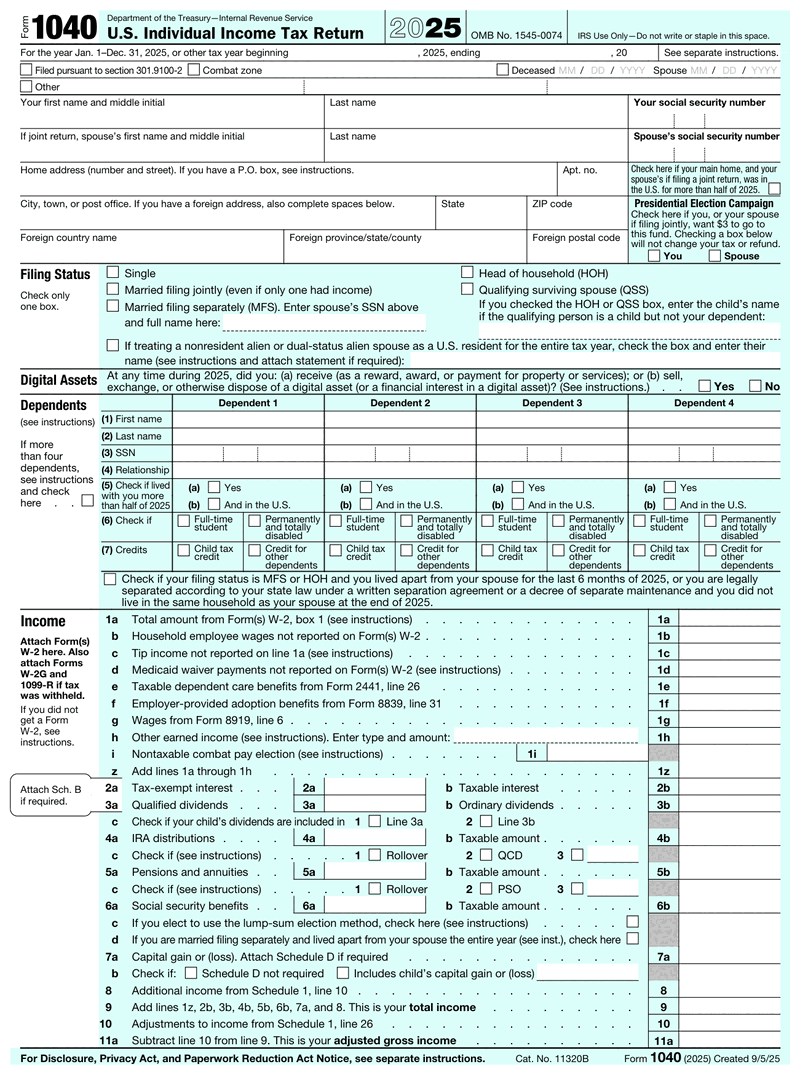
Form 1040 is the IRS US Individual Income Tax Return, the main form Americans use to file their federal income taxes each year. It pulls together your income from every source, applies your deductions and credits, and calculates whether you owe money or get a refund.
Think of it as the summary sheet for your whole tax year. Your W-2 and any 1099s from clients are supporting documents that feed into it. They are not replacements, and sending them in alone does not count as filing.
Everyone uses the same base form 1040, whether your income comes from one paycheck or from five sources. What changes is how many schedules you attach. There have been no separate versions for different filers since 2018, when the 1040A and 1040EZ were retired.
Most US citizens and residents must file Form 1040 if their income passes the threshold for their filing status and age. Self-employed people file at just $400 in net earnings. Even below the threshold, filing is often worth it to claim withheld tax back as a refund.
The thresholds shift a little each year. They also depend on your filing status: single, married filing jointly, married filing separately, head of household, or qualifying surviving spouse. Age matters too, since filers 65 and older get a higher threshold.
If you are a contractor or run a side business, that $400 figure is the one to watch. It counts net earnings, meaning after expenses, and it applies even if no single client sent you a 1099. A plain-English walkthrough of self-employed taxes covers what else changes. US citizens and green card holders living abroad generally still have to file, since the US taxes worldwide income no matter where you happen to live.
Enter your
information
Preview
your form
Download
your form
| What | When | Worth knowing |
|---|---|---|
| File your 2026 Form 1040 | April 15, 2027 | E-filed or postmarked by this date counts as on time |
| Pay any tax owed | April 15, 2027 | An extension does not extend payment |
| File with a Form 4868 extension | October 15, 2027 | Automatic six months - file the 4868 by April |
| Quarterly estimated payments (1040-ES) | April / June / September / January | If income has no withholding |
Dates falling on a weekend or legal holiday shift to the next business day.
It is two pages. Page one collects who you are: your name, Social Security number, filing status, and any dependents, then walks down your income lines. Page two does the math: your tax, the credits you qualify for, and what you already paid in. What is left is your refund or the balance you owe.
Once you see that split, the length stops being intimidating. The whole form follows one pattern: report everything, then subtract what you are allowed. Income first, adjustments and deductions next, credits after that, and whatever is left gets settled at the bottom.
Filling it out goes faster when you work in order instead of skipping around. Here is the sequence:
Most people need no schedules at all. You attach one only when you have something the main form 1040 has no line for.
Here is how that plays out in practice. Say you work a regular W-2 job and pick up freelance design work on the side. Your wages go straight on the 1040. Your freelance profit runs through Schedule C, lands on Schedule 1, and the self-employment tax on it shows up on Schedule 2. If a client never sent you a 1099, you still report that income, and reporting freelance income without a 1099 explains how.
Modified adjusted gross income (MAGI) is your adjusted gross income with certain deductions added back, such as student loan interest or foreign income exclusions. The IRS uses it to decide whether you qualify for things like IRA deductions and health insurance subsidies. It is calculated from your 1040, not printed on it.
The chain is straightforward. Start with gross income, which is everything you earned. Subtract your adjustments and you have AGI, which does appear on the form. Add a few of those adjustments back and you have MAGI.
For example, you earn $70,000 and deduct $2,000 of student loan interest, so your AGI is $68,000. For any benefit that adds student loan interest back, your MAGI is $70,000. That gap can push someone over an eligibility limit, which is why the number matters even though no line shows it. Retirement saving interacts with it too, which is covered in do 401(k) contributions reduce MAGI.
This is the senior version of the same return. You can use it if you are 65 or older by the end of the tax year. On a joint return, only one spouse needs to qualify.
The differences are cosmetic, not mathematical. The 1040-SR uses larger print and wider spacing. It also prints the standard deduction chart right on the form. Line numbers match the standard form exactly, the same schedules attach, and the tax comes out identical.
It is completely optional. You may see it written as 1040 SR, 1040-sr, or 1040sr, and they all mean this same return. Plenty of people over 65 keep filing the standard form instead, and if you e-file, your software picks the layout for you.
The IRS publishes them free on its website, and they are the authority on every line, right down to which box an unusual type of income belongs in. You can read the current version at irs.gov.
Nobody reads them cover to cover, and you should not try. Use them the way a mechanic uses a service manual: when line 6b confuses you, jump to line 6b. The 1040 instructions are organized in line order, so finding your spot takes seconds.
Two things are worth knowing. The tax tables sit in the back, where you turn if you calculate by hand. And each schedule has its own instruction document, so Schedule C questions get answered there.
If you are paper filing, there is no single IRS address. Where to mail federal tax return paperwork depends on two things: the state you live in, and whether you are enclosing a payment. Those two answers point to different processing centers, and the addresses change from time to time.
Do not trust an address copied off a website. Check the current one on the IRS Where to File page, the only version guaranteed to be up to date.
Most people are better off e-filing. You get a timestamped acceptance confirmation, a far stronger paper trail than a mailed envelope, and refunds arrive faster. You can then follow your money through the IRS Where's My Refund tool. Paper tax returns also get rejected for small things an envelope cannot warn you about, like a missing signature.
Most rejected returns come down to a handful of small errors. Make sure you check these before anything goes out.
The 2026 filing season covered tax year 2025, and that return was due April 15, 2026. If you filed for an extension, you have until October 15, 2026. Looking ahead, your tax year 2026 return will be due April 15, 2027.
One catch trips people up every year: an extension to file is not an extension to pay. Any tax you owed for 2025 was still due back in April, and interest and late-payment penalties have been adding up since then. If you have missed the date entirely, file anyway rather than waiting. The penalty for filing late is much steeper than the one for paying late, so every week you sit on it costs you more.
Self-employed filers making quarterly estimated payments have their own due dates, separate from this one.
Our 1040 generator handles the layout so you can focus on your numbers. You enter your details in guided fields. It formats everything into a clean, correctly structured 1040 form that you download as a PDF right away.
You preview it free and pay only when you download, with no subscription to sign up for, and the whole thing works on your phone. The template matches the official structure, so what you download looks like what the IRS expects to see.
One honest note on scope: this creates a completed, properly formatted tax document for your records or your preparer. Submitting it to the IRS is still a separate step you take yourself.
Form 1040 is reissued every year, so "1040 form 2025" and "1040 form 2026" really are two different documents. The year printed on the form is the year you earned the income, not the year you file it in. Grab the wrong one and your deduction amounts will be off.
What moves between them is the arithmetic on the form:
| Tax year 2025 | Tax year 2026 | |
|---|---|---|
| Return due | April 15, 2026 | April 15, 2027 |
| Due with an extension | October 15, 2026 | October 15, 2027 |
| Standard deduction, single | $15,750 | $16,100 |
| Standard deduction, married filing jointly | $31,500 | $32,200 |
| Standard deduction, head of household | $23,625 | $24,150 |
| State and local tax deduction cap | $40,000 ($20,000 married filing separately) | $40,400 ($20,200 married filing separately) |
For 2026, that state and local cap shrinks if your modified adjusted gross income tops $505,000 ($252,500 if married filing separately), though it never drops below $10,000 ($5,000 separately).
One addition is easy to miss on the 2025 return: Schedule 1-A, "Additional Deductions," which is where the tips, overtime, car loan interest and senior deductions get claimed. Per its own instructions it attaches to Form 1040, 1040-SR or 1040-NR. The IRS has not posted a draft 2026 Form 1040 yet, so line-level differences on that version cannot be confirmed.

4.4 out of 5.0 stars on 717 reviews
Yes. Your W-2 reports what you earned and what was withheld, but it does not file anything on your behalf. You still submit a return to reconcile the two and claim any refund you are owed. Most single-job filers can finish it without attaching any schedules.
Only the presentation. The senior version is available to filers 65 and older and uses larger print, with the standard deduction chart printed on it. Line numbers, schedules, and the final tax calculation are identical, so neither option saves you money or changes what you owe.
It depends on your state and on whether you are including a payment, since those go to different IRS processing centers. Check the current address on the official Where to File page before mailing, because these change. E-filing avoids the question entirely and confirms receipt.
The IRS never charges anything for the blank paperwork, and you can pull it straight off their site. Our generator works a bit differently: you preview your completed return free and pay only when you download it, with no subscription. What you get is a clean PDF with no watermark. You may still pay a preparer or a software provider separately if you choose to work with one.
Gather your W-2s, any 1099s, interest and dividend statements, records of estimated payments, and Social Security numbers for yourself and your dependents. If you plan to itemize, add receipts for deductible expenses such as mortgage interest, charitable gifts, and medical costs.
Fill out our contact form, and we will get back to you as soon as we can!
Contact us Hi! How can I help you?  Kris
Kris