Our customer support is available 24/7:

Generate a professional 1099-R in minutes, with the formatting done for you.
Rated 4.4/5 (770+ reviews) 35+ tax forms No subscription required
You paid out a retirement distribution this year, and now you need to work out who issues the 1099-R. Usually it is the plan administrator or custodian, not you. But if your business pays a distribution directly out of a plan it administers itself, the filing lands on you. If that's a surprise, take a breath. This is a short form, you already have most of what goes on it, and it's less of a headache than it looks.
Quick check: if a 1099-R already arrived, you have nothing to create. Need proof of income instead? Create a pay stub.
Here's what a 1099 R actually reports, which boxes matter, what changed on the 2026 version, and when everything is due. Then you can create your form and be done with it.
Form 1099-R reports distributions of $10 or more paid out of a pension, annuity, retirement or profit-sharing plan, IRA, or insurance contract. If you paid the money out, you fill it out and file it. If you received one, you simply report the amounts on your tax return.
Its purpose is narrow. The form exists so the IRS can match what came out of retirement accounts and insurance contracts against what people report on their returns. That two-sided split is where most of the confusion starts, so it's worth being blunt about it. The payer, meaning the financial institution, plan administrator, employer, or insurer that actually sent the money, carries the whole filing burden. You prepare the form, deliver a copy to the person you paid, and file another copy with the IRS.
The recipient's job is much smaller. They take the figures off the form and copy them onto their return. That's it. Nobody who receives one of these needs to fill anything out.
People write this form's name a dozen different ways. Some search what is a 1099 r, others what is 1099-r or what is a 1099-r form, and plenty just call it a 1099r tax form. Hyphen, space, or nothing at all, what is 1099 r and what is a 1099r and what is 1099r are the same question yet again. The IRS only ever writes it as Form 1099-R, so that's the spelling to put on anything you actually file or hand to a recipient.
1099-R vs 5498 vs W-2
These three tax forms get mixed up constantly, and the difference is simple once you see it side by side:
None of them touch ordinary payment transactions like paying a vendor or a contractor.
The trigger is low. If you made a designated distribution of $10 or more from a pension, annuity, profit-sharing or retirement plan, IRA, or insurance contract, a form is required. There's no "it was only a small payout" exception worth relying on.
In practice, the filers are:
You file one form per recipient per distribution code, which is why one person can end up with two forms in the same year. If you also pay contractors, issuing a 1099-MISC follows the same pattern.
Enter your
information
Preview
your form
Download
your form
Recipient copies of the 1099-R are due by January 31, 2027; the IRS copy follows on the information-return schedule (end of February on paper, end of March e-filed).
Only if you paid the distribution. If a 1099-R arrived from a plan administrator like Fidelity, a state pension system such as CalPERS, or OPM, you do not create anything. You only need a 1099-R generator if you are the payer: a plan administrator, employer, IRA trustee, insurer, or executor.
That's worth saying plainly because most people who search for this form have already received one. Large retirement plan administrators, state systems like CalSTRS, and federal retiree services send out millions of these every January. If yours came from one of them, there's nothing for you to generate.
You're in the other group if you sit on the paying side. Maybe you run a small business with a retirement plan and someone cashed out. Maybe you're the trustee on a solo 401(k), or you're settling an estate and had to distribute an IRA. In each case the obligation is yours, and you don't need enterprise payroll software to meet it.
If you filed one of these a couple of years ago, the layout moved. The 2026 form 1099-r renumbered several boxes, so working from an old template is a fast way to put the right number in the wrong place.
Here's what changed:
None of this changes what you report. It changes where it goes. You can confirm every one of these against the IRS instructions for Forms 1099-R and 5498.
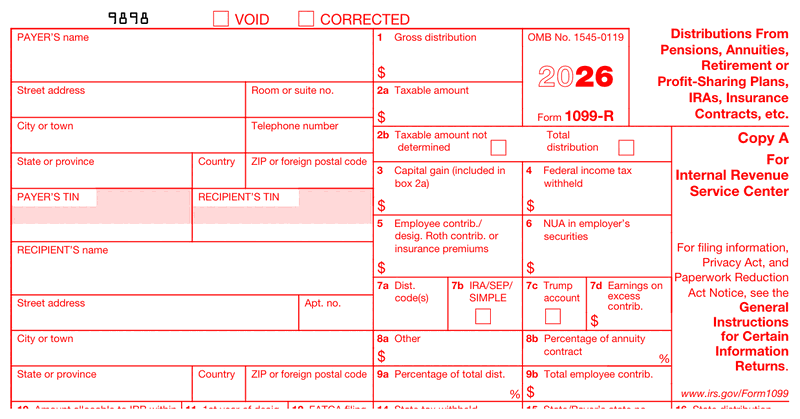
This is the reference version of the 1099 r form. It covers what each box means, not the order you fill them in. The step-by-step sequence comes next.
At the top you'll find the payer's name, address, and TIN, then the same three for the recipient. There's also an account number field if you use one to tell multiple accounts apart.
From there, the numbered boxes on the 1099-r form work like this:
Anyone who has filled in a 1099r form before will recognize most of this. The numbering is what moved, not the meaning.
If you get one thing right on this form, make it this box. The 1099-r distribution codes tell the IRS how to treat the money. Pick the wrong one and you can turn a tax-free rollover into a taxable event on someone else's return.
These are the codes you'll reach for most often:
| Code | What it means |
|---|---|
| 1 | Early distribution, no known exception |
| 2 | Early distribution, exception applies |
| 3 | Disability |
| 4 | Death |
| 7 | Normal distribution |
| B | Designated Roth account distribution |
| G | Direct rollover and direct payment |
| H | Direct rollover of a designated Roth account distribution |
| J | Early distribution from a Roth IRA, no known exception |
| L | Loans treated as deemed distributions |
| M | Qualified plan loan offset |
| Q | Qualified distribution from a Roth IRA |
| Y | Qualified charitable distribution |
There are 30 codes in total, and some get used in combination. Code Y is the newest addition, and for 2026 the IRS still lets you decide whether to use it. If your situation isn't on this short list, check the full guide to distribution codes in the IRS instructions before you file.
Now the order of operations. Most of this is information you already have on file, so it moves faster than you'd expect.
One note on delivery: you can mail the recipient copy or send it electronically, but electronic delivery needs the recipient's consent first. Don't assume email is fine.
Ready to skip the manual formatting? The 1099-R generator on this page lays out the current 2026 boxes for you, so you're filling in fields instead of matching numbers to a template.
Not always. It depends on Box 2a (the taxable amount) and the code in Box 7a. A direct rollover coded G is generally not taxable, while a normal distribution coded 7 usually is. Early distributions coded 1 may add a penalty. Check both boxes before you assume.
This section is for the people who arrived here holding a form rather than preparing one. Getting one in the mail doesn't automatically mean you owe income tax on the full amount in Box 1. Plenty of these forms report money that's already been taxed, rolled straight into another account, or returned as a qualified Roth distribution.
Money going into a plan and money coming out follow different rules, so how 401(k) contributions were treated on the way in doesn't settle what you owe now. The quickest read is this: look at Box 2a first, then Box 7a. If Box 2a is much smaller than Box 1, part of the distribution was after-tax money. If Box 7a shows a G or an H, the money moved between accounts rather than into your pocket.
Early withdrawals are where taxes bite hardest. A code 1 generally means an additional penalty on top of ordinary income tax. That's why a 401k tax form for an early cash-out often costs more than people expect. If your form shows a code you don't recognize, or the numbers don't match what you remember receiving, talk to a tax professional. That's a real judgment call, not something to settle from a web page.
Deadlines are where first-time filers get caught, and the dates shift year to year. For tax year 2026, filed in early 2027:
| What | When |
|---|---|
| Recipient copy furnished | Monday, February 1, 2027 |
| Paper filing with the IRS | Monday, March 1, 2027 |
| Electronic filing with the IRS | Wednesday, March 31, 2027 |
Those first two dates look odd if you know the rules, so here's why they moved. The recipient copy is normally due January 31, but January 31, 2027 falls on a Sunday. Paper filing is normally due February 28, and that's a Sunday too. When a due date lands on a Saturday, Sunday, or legal holiday, you're on time if you file the next business day. Most competing pages just print "January 31" and leave you to work it out.
One more thing worth knowing early: if you're filing 10 or more information returns in total, electronic filing is mandatory. And if you plan to e-file through the IRS IRIS system, request your Transmitter Control Code well before January. Getting set up is not instant, and it's a bad thing to discover in late January.
Filing late or filing wrong carries a per-form penalty, and it scales with how late you are. The consequences stack up the same way as not filing taxes at all. Correcting something quickly costs far less than leaving it. The amounts shift with inflation adjustments each year, so check the current figures on the IRS page for Form 1099-R before you assume the damage.
If you've already filed and spotted a mistake, you can fix it. Prepare a new form, check the "CORRECTED" box at the top, file it with the IRS, and send the corrected copy to the recipient as well. Don't leave the recipient working from the wrong document while you sort out the IRS side.
On records, keep your copy of every form 1099r you issue along with the documentation that backs up the amounts. Three years is the general rule, but stretch it to four if you withheld any federal tax, which happens on most retirement distributions anyway. Storing them as a searchable document beats a shoebox.
Federal filing doesn't always finish the job. Some states want their own copy of the 1099-r form. Others receive it automatically through the Combined Federal/State Filing Program. A few have no requirement at all, because they don't tax retirement income.
Boxes 14, 15, and 16 hold the state detail: tax withheld, the state or payer's state number, and the state distribution amount. If you withheld state tax, those boxes need to be filled in regardless of how your state handles filing.
Requirements vary and they change, so check with your state's revenue department before you file.
Building this form by hand means finding a current template, matching your numbers to renumbered boxes, and hoping the formatting survives printing. A 1099 r generator removes those steps.
For a small number of forms, it's the difference between an afternoon and a few minutes.
Unlike several of its 1099 siblings, Form 1099-R has genuine annual versions, with the tax year printed on Copy A. So "1099-R form 2025" and "1099-R form 2026" really are two different documents, not one PDF wearing a different date. Match the form year to the year the money left the plan, not the year you sit down to fill it in.
| Deadline | Tax year 2025 | Tax year 2026 |
|---|---|---|
| Recipient copy | February 2, 2026 | February 1, 2027 |
| Paper filing with the IRS | March 2, 2026 | March 1, 2027 |
| E-filing with the IRS | March 31, 2026 | March 31, 2027 |
Issuing late for a distribution you paid out in 2025? Still use the 2025 form. The 2026 layout would drop your figures into boxes that did not exist for that year.
Need more time on the IRS side? Form 8809 gives an automatic 30 days, but only if you file it by your original due date, and those 30 days run from whichever due date applies to you, paper or electronic. The IRS publishes no single extended calendar date for this form, so don't go hunting for one.
One last thing: if you also file the companion Form 5498, it keeps its own May 31 / June 1 deadline. Don't read that one off this table.

4.4 out of 5.0 stars on 717 reviews
Contact the payer first, since they may have an old address on file. Many plan administrators also post the form in your online account before mailing it. If it still does not arrive by mid-February, call the IRS. You must report the distribution either way.
You should not. Request it in writing using Form W-9 before you file. If the recipient refuses, you may still have to file with the TIN left blank, which can trigger a penalty notice. Ask early, well before January, so you are not chasing it at the deadline.
Box 1 is the total gross distribution. Box 2a is only the part that is taxable. They differ when the distribution includes after-tax contributions, a Roth component, or a rollover. If the payer cannot determine the taxable amount, they leave Box 2a blank and check the box in 2b.
Not for each payment, but you do need a separate form for each distribution code and each recipient. If someone took both a normal distribution and a direct rollover in the same year, those need two forms because the Box 7a codes differ.
Yes. Enter the payer details, recipient details, distribution amounts, and Box 7a code, then download a print-ready form in a couple of minutes. Our generator uses the current 2026 layout, so the renumbered boxes are already in the right place. No software install needed.
Fill out our contact form, and we will get back to you as soon as we can!
Contact us Hi! How can I help you?  Kris
Kris