Our customer support is available 24/7:

Generate your W4 form in an instant. Fast, easy to use and eliminates errors.
Rated 4.4/5 (770+ reviews) 35+ tax forms No subscription required
Starting a new job? Someone probably handed you a W4 form and assumed you'd already know exactly what to do with it.
This W4 generator walks you through every line, then gives you a clean copy to sign. Preview free, pay only when you download.
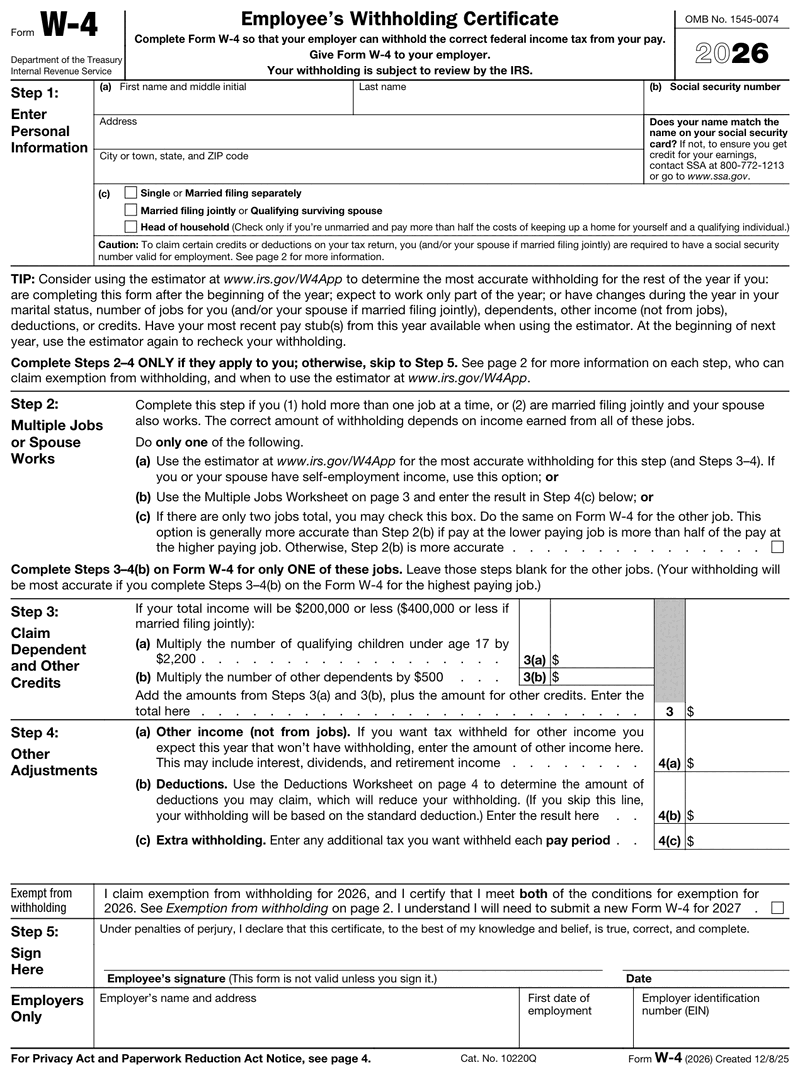
A W4 form, officially the Employee's Withholding Certificate, tells your employer how much federal income tax to take out of each paycheck. You fill it out when you start a job or when your money situation changes. Your employer keeps it on file. It never goes to the IRS.
You might see the W-4 form written as Form W-4, but it's all the same document. So what is a W4 tax form doing for you, really? It sets your tax withholding, so getting it right keeps your paycheck and your April tax bill in balance.
Any W-2 employee starting a new job fills out a W4. You'll also want to update yours after a big life change, like getting married, having a child, or picking up a second job. Independent contractors don't use a W4. They fill out a W-9 instead.
It's smart to submit a fresh form W4 after any of these:
There's also an exempt option. If you had no federal tax liability last year and expect none this year, you can claim exempt. Just remember you have to renew that status every year by February 15.
Enter your
information
Preview
your form
Download
your form
| What | When | Worth knowing |
|---|---|---|
| Hand it to your employer | On or before your first day | Payroll cannot run correctly without it |
| Update after a life change | Any time | Takes effect within a payroll cycle or two |
| No W-4 on file | Default applies immediately | Withholding at the highest single rate |
Dates falling on a weekend or legal holiday shift to the next business day.
Here's how to fill out a W4, explained simply. Think of it as a how to fill out a W4 for dummies walkthrough: plain steps, with no tax background needed. The 2026 form has five steps, but if your taxes are straightforward, you only need Steps 1 and 5. Knowing how to fill out W4 sections in order keeps the whole thing quick.
Enter your name, address, Social Security number, and filing status (single, married filing jointly, or head of household). Double-check the spelling of your name and every digit of your SSN. This is the part most employers reject when something is off.
Complete this only if you work more than one job, or if you're married filing jointly and your spouse also works. For the most accurate result, use the IRS Tax Withholding Estimator. It handles the multiple jobs math and tells you what to enter, which really matters for side-gig and second-job income.
If you make less than $200,000 (or $400,000 married filing jointly), you can claim dependents here. For 2026, you multiply each qualifying child under 17 by $2,200, and each other dependent by $500. Have more than one job? Only fill out this step on the form for your highest-paying one.
This optional step is where you ask for extra withholding, report other income, or list deductions beyond the standard amount. The 2026 form also puts the exempt option here as a simple checkbox, so claiming exemption is easier than the old handwritten note.
Your form isn't valid until you sign and date it. Once you do, hand it to your employer, who keeps it on file and uses it to set your withholding. That's it. You're done.
The 2026 W4 form is not just a year-label update. The IRS finalized it in December 2025 under the One Big Beautiful Bill Act, and it's now five pages instead of four. These W-4 2026 changes are real, not cosmetic. Reusing an old copy? Stop and grab the current W4 2026 version, because the entries really did change.
Looking for what changed on the W4 form 2026? These updates matter most:
Those tip and overtime lines matter if you work in a restaurant, a shop, or hospitality. A server or retail associate can estimate that income right on the 2026 W4 form, so withholding better matches real take-home pay. For the official 2026 W-4 form details, the IRS page About Form W-4 is the source to trust.
Small slips on this form can cost you real money, so make sure you steer clear of the common ones:
They sound alike, but they do opposite jobs. You fill out a W4 before or when you're hired to tell your employer how much tax to withhold, and your employer keeps it. A W-2 comes later. Your employer sends it after year-end to report what you earned and what was withheld, and a copy goes to the IRS. Curious how those W-2 numbers come together? Here's how to calculate your W-2 wages from a paystub.
You don't have to print, scribble, and rescan. Our W4 generator lets you fill in each field online, add your signature, and download a clean, ready-to-hand-over copy. Preview it free, then pay only when you download. No subscription, no account clutter.
Search "w4 form 2025" or "w4 form 2026" and you'll find two genuinely different documents, because the IRS does reissue this one every year. Use the version for the year you're filling it out in, since withholding comes out of the paychecks ahead of you, not the ones behind you. There's no filing deadline to miss either way, because the form sits in your employer's file and never goes to the IRS. Beyond the tips, overtime, and dependent lines above, here's what else moved:
| On the form | 2025 W4 | 2026 W4 |
|---|---|---|
| Itemized deductions on the worksheet | One combined line | Split into 6a medical, 6b state and local taxes, 6c home mortgage interest, 6d gifts to charities |
| State and local taxes you can enter | Capped at $10,000 | Up to $40,400 ($20,200 if married filing separately), if your total income is less than $505,000 ($252,500 if married filing separately) |
| If you or your spouse are 65 or older | Not on the form | $6,000 each, if total income is under $75,000 (or $150,000 married filing jointly) |
| If you claimed exempt, submit a new W4 by | February 17, 2026 | February 16, 2027 |
If you handed in a 2025 W4 and nothing in your life has changed, your employer keeps using it. You only need the current version when you start a job, adjust your withholding, or renew exempt status.

4.4 out of 5.0 stars on 717 reviews
So what's the purpose of the W-4 form? It tells your employer how much federal income tax to withhold from your pay. Get it right and you avoid a surprise bill at tax time, or a refund that means too much was held back all year.
No, you don't have to fill out a new W4 every year. You complete one when you start a job, and it stays in effect until you change it. The exception is claiming exempt status, which you do have to renew each year by February 15.
Yes, you can sign your W4 electronically. An e-signature is valid, and most employers accept a signed digital copy. Keep in mind your employer or the IRS may occasionally ask for a printed version, so save a clean copy you can print if needed.
If you don't fill out a W4, your employer still has to withhold taxes. They'll treat you as single with no other adjustments, which usually means more tax comes out of each check. Filling out the form gives you control over how much is withheld.
The federal W4 only covers federal income tax withholding. It does not set your state taxes. Many states use their own separate withholding form, so ask your employer whether you need to complete a state version too when you start.
Fill out our contact form, and we will get back to you as soon as we can!
Contact us Hi! How can I help you?  Kris
Kris