Our customer support is available 24/7:

A simple way to create your Schedule C online. Generate, print and use.
Rated 4.4/5 (770+ reviews) 35+ tax forms No subscription required
If you're self-employed, a freelancer, or a gig worker, Schedule C is the form that tells the IRS how your business did this year. It's where you report what you earned and subtract what you spent, and the leftover number, your profit or loss, lands on your personal tax return. That can feel like a lot when you're staring at a blank form, but it's more manageable than it looks. When you're ready, our fillable Schedule C form generator does the math and hands you a clean PDF to attach to your Form 1040. You preview it free and pay only when you download, with no subscription.
Schedule C (Form 1040) is the IRS form where you report the profit or loss from a business you run on your own. You add up your business income, subtract your expenses, and the net profit carries over to your personal tax return. Sole proprietors and freelancers use it every year.
Its official name is "Profit or Loss From Business (Sole Proprietorship)." Think of it as the story of your business for the year, told in numbers. You'll see it written a few different ways: some people call it Form 1040 Schedule C, others write Schedule C 1040, and the IRS form Schedule C is the same document every time. A lot of first-timers ask, what is a Schedule C tax form? In plain terms, it's your business's yearly scorecard. You don't mail the Schedule C tax form to the IRS by itself. It rides along with your 1040 return, attached to your regular filing. The bottom-line figure, your net profit, first flows to Schedule 1, then onto your Form 1040, where it gets taxed along with your other income. Folks also call it "sch c" or the irs schedule c, but it's all the same form. You can read the official overview on the IRS Schedule C page, but the plain-English version is right here.
You need to file Schedule C if you earned money as a sole proprietor, freelancer, gig worker, or independent contractor. That includes anyone driving for Uber, delivering with DoorDash, or selling on Etsy. If your business cleared $400 or more in net profit, you'll also owe self-employment tax.
In practice, that covers a huge chunk of people. If you drive for Uber or Lyft, deliver for DoorDash or Instacart, freelance on Upwork or Fiverr, sell handmade goods on Etsy, or run any kind of side hustle, the money you make is schedule c income. Those platforms usually send you a 1099-NEC or 1099-K, and the totals on those forms feed straight into the income line of your Schedule C. Even if you never got a 1099, you still report the cash you earned.
A few business types don't use this form. Partnerships and S or C corporations file their own returns, and rental real estate income goes on Schedule E instead. But if it's just you and your business, Schedule C is almost always the right home for your numbers on your business tax return.
Enter your
information
Preview
your form
Download
your form
| What | When | Worth knowing |
|---|---|---|
| File with your Form 1040 | April 15, 2027 | The schedule follows your return |
| Extended deadline with Form 4868 | October 15, 2027 | The extension covers the whole return, Schedule C included |
| Quarterly estimated tax on the profit | April / June / September / January | Via 1040-ES vouchers |
Dates falling on a weekend or legal holiday shift to the next business day.
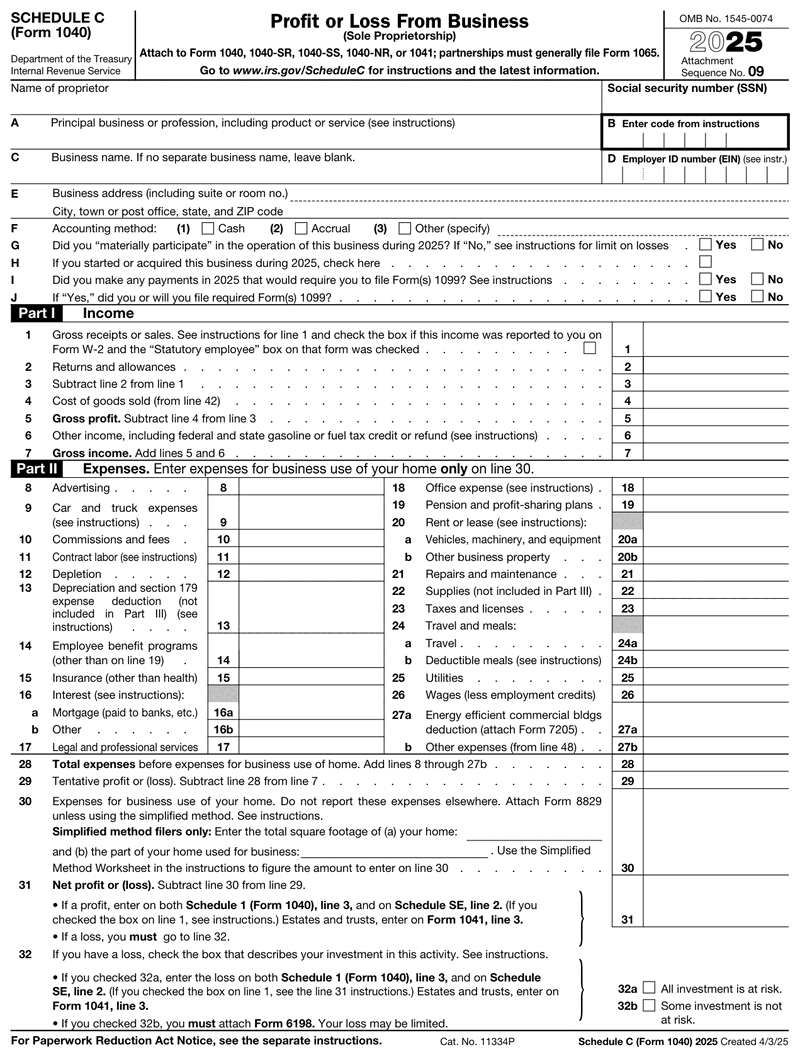
Here's the part that trips people up, so let's take it slowly. The schedule c instructions below follow the actual order of the form, from the header down through the five parts. Have your income records and expense receipts handy, and it goes faster than you'd think.
The top of the schedule c form asks who you are and what you do:
This part totals up what your business brought in:
Now you subtract the cost of running your business. You won't use every line, just the ones that apply to you:
Keeping good records here pays off, and knowing your 1099 tax deductions helps you claim everything you're entitled to.
You only fill out Part III if you sell physical products or carry inventory. It walks through your inventory at the start and end of the year, plus purchases and materials. The total lands on Line 4 up in Part I. If you're a service freelancer with no products, skip this part entirely.
If you claimed car or truck costs on Line 9, Part IV backs it up. You list the date you started using the vehicle for business and your business, commuting, and personal miles for the year. This is why a mileage log matters, since these numbers support your deduction.
Part V is a catch-all for business costs that don't fit the categories in Part II, like software subscriptions or bank fees. You list each one, add them up, and the total carries back to Line 27b. Do not use Line 27a: on the current form that line is the energy efficient commercial buildings deduction and it requires Form 7205 attached.
A quick tip from building this tool: the mistakes we guard against most are entering both the standard mileage rate and actual car expenses, leaving the accounting-method box unchecked, and mismatching the business name and legal name. Double-check those three before you download.
If you use your car for work, you get to choose how you deduct it. The first option is the standard mileage rate, a set number of cents per business mile; confirm the current standard mileage rate on irs.gov. The second is the actual expense method, where you add up gas, repairs, insurance, and depreciation, then deduct the business-use share. You can't use both methods for the same car in the same year, so pick one.
For most gig drivers, the standard mileage rate is simpler and only needs a clean mileage log. The actual method can pay off if your vehicle is expensive to run, but it takes more receipts and record-keeping. Either way, the deduction shows up on Line 9.
Work from home? You may be able to deduct part of your housing costs on Line 30. There are two ways to do it. The simplified method gives you $5 per square foot, up to 300 square feet, for a maximum of $1,500. The regular method uses Form 8829 to calculate the actual percentage of rent, utilities, and insurance tied to your workspace.
The catch is that the space has to be used regularly and only for business. A spare room set up as your office counts. The kitchen table where you also eat dinner does not. Pick whichever method gives you the bigger, honest deduction.
Schedule C rarely travels alone. Its net profit feeds several other forms, and knowing how they connect keeps your return accurate:
That self-employment piece is the part of schedule c taxes that catches first-timers off guard, so it's worth reading up on self-employed taxes before you file so there are no surprises.
Your Schedule C is due with your Form 1040, so the deadline is the usual April 15 (or the next business day if it falls on a weekend or holiday). You can e-file it with the rest of your return or mail it in. If you need more time, Form 4868 gets you an extension to October, but any tax you owe is still due in April.
One more thing to plan for: if you expect to owe $1,000 or more, the IRS wants you to pay quarterly estimated taxes during the year instead of all at once. Setting a little aside each month keeps that spring bill from stinging.
This is where the generator earns its keep. Instead of wrestling with a blank PDF, you enter your business info, your income, and your expenses, and the tool does the math for you: gross profit, total expenses, and your net profit or loss. Then you sign on screen and download a clean, print-ready PDF ready to attach to your 1040.
Here's a habit that saves gig workers real time: fill out and download your schedule c form 1040 from your phone between jobs, then save the PDF to Google Drive or Dropbox. When your accountant or a lender asks for it, you forward the same file in seconds. Just remember it holds your SSN or EIN, so only share it through secure email or a trusted portal. Ready to skip the blank-form headache? Try our Schedule C generator and let it handle the formatting. You can preview your form free and pay only when you download it, with no subscription.
Schedule C is reissued every tax year, so "schedule c form 2025" and "schedule c form 2026" really are two different documents. Most of the form is identical; the differences sit on the expense lines.
| What you're filing | Which version | When it's due |
|---|---|---|
| Tax year 2025 | 2025 final: line 16a Mortgage, 16b Other; line 27a Energy efficient commercial bldgs deduction (attach Form 7205), 27b Other expenses | April 15, 2026 |
| Tax year 2026 | 2026 draft: line 16 splits three ways, 16a Mortgage, 16b Vehicle loan, 16c Other | April 15, 2027 |
The line to watch is the new 16b. It covers interest on a loan for a vehicle you use in your business. The personal car loan interest deduction is claimed on Schedule 1-A, not on Schedule C, so don't enter the same interest in both places.
Your due date doesn't depend on which version you pull, because Schedule C has no deadline of its own. It inherits your Form 1040's: April 15, 2026 for a 2025 Schedule C, April 15, 2027 for a 2026 one, and October 15, 2026 or October 15, 2027 if you extend with Form 4868. No separate extension exists for Schedule C alone.
One caveat: the 2026 line numbers above come from the IRS draft, so confirm them against the final form before you file.

4.4 out of 5.0 stars on 717 reviews
For the 2026 tax year, self-employment tax applies to net earnings up to a $184,500 Social Security base, and the simplified home office deduction is capped at $1,500. For your vehicle deduction, confirm the current standard mileage rate on irs.gov. The 100% bonus depreciation was also restored for assets placed in service after January 19, 2025.
If you skip it, the IRS can hit you with a failure-to-file penalty of 5% of the unpaid tax per month, capped at 25%. On a $10,000 tax bill, that's up to $2,500 in penalties alone, before interest. Underreporting your income can also trigger audits and extra penalties, so it pays to file.
The frequent ones are picking the wrong business activity code on Line B, claiming both the standard mileage rate and actual car expenses, answering "yes" to making 1099 payments on Line I but "no" to filing them on Line J, and forgetting to reconcile your 1099-K and 1099-NEC totals with your reported gross receipts.
Keep your 1099s, receipts, invoices, mileage logs, and home-office square-footage notes for at least three years, since that's the standard IRS audit window. If you understated your income by more than 25%, the IRS can look back six years, so hold onto records for longer when in doubt.
No, they work together but do different jobs. A 1099 is the form a client or platform sends to report the money they paid you. Schedule C is where you take that income, subtract your business expenses, and report the net profit. One is the statement, and the other is your return.
Fill out our contact form, and we will get back to you as soon as we can!
Contact us Hi! How can I help you?  Kris
Kris